

As someone who's spent countless hours juggling tasks, appointments, and deadlines, I've come to appreciate the value of a good planner. But let's face it – traditional paper planners can be bulky, and their rigid structures often can't keep up with our ever-changing lives. That's where digital planner templates come in, and when paired with a powerful tool like OneNote, they become an unstoppable productivity duo.
What Makes Digital Planner Templates for OneNote So Appealing?
Digital planner templates for OneNote offer a unique blend of flexibility and structure. By combining the freeform nature of digital note-taking with the guidance of a planner template, you can create a system that truly works for you. Whether you're a student, professional, or simply someone looking to get their life in order, these templates provide a versatile framework for organizing your thoughts, tasks, and goals.
One of the primary benefits of using digital planner templates in OneNote is the ability to customize them to your heart's content. Unlike traditional planners, which can be limiting in their layout and design, digital templates can be easily tailored to fit your specific needs. Want to add a new section for tracking habits? No problem. Need to change the layout to suit your personal style? Easy.
Getting Started with Digital Planner Templates in OneNote
So, how do you get started with digital planner templates in OneNote? The process is surprisingly straightforward. First, you'll need to create a new notebook in OneNote or open an existing one where you'd like to add your planner. Next, you can search for digital planner templates online – there are plenty of resources available, from Microsoft's own template gallery to third-party websites and communities.
Once you've found a template that resonates with you, simply download it and import it into your OneNote notebook. From there, you can start customizing the template to fit your needs, adding or removing sections as necessary.
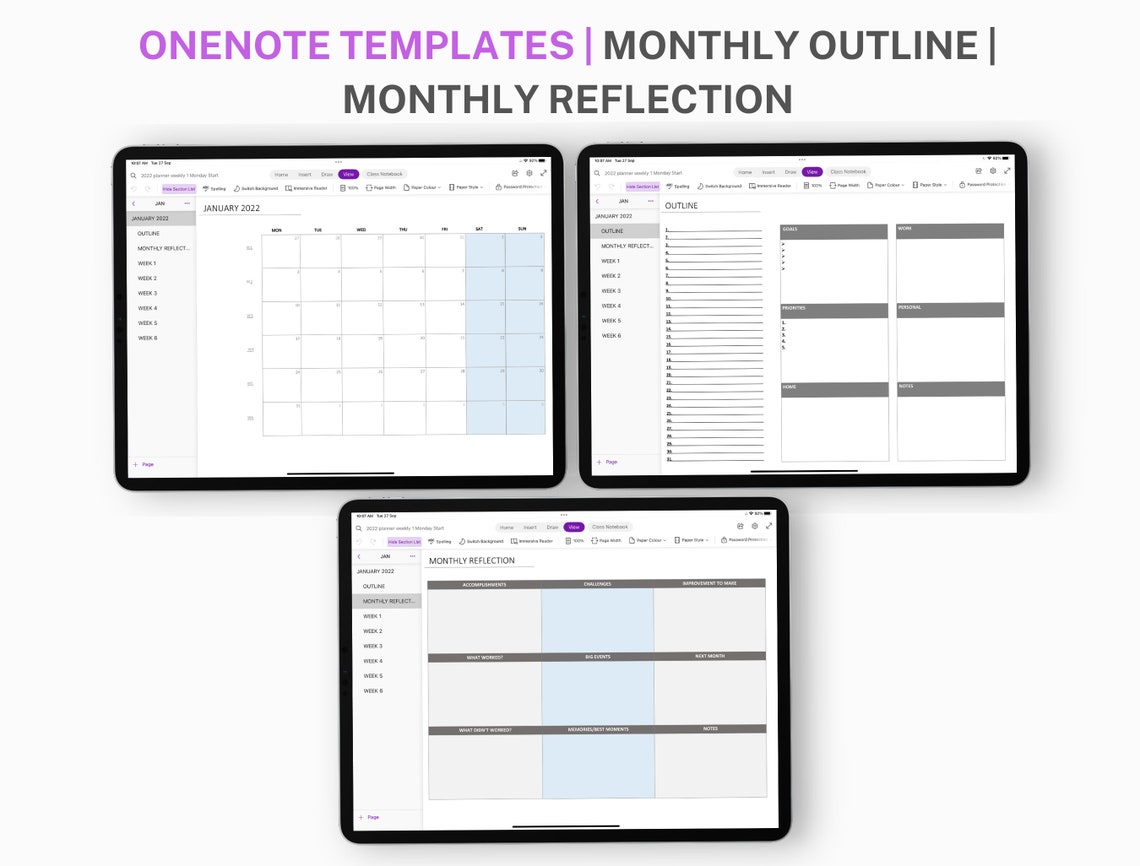
Customization and Flexibility: The Heart of Digital Planning
One of the things that sets digital planner templates apart from their physical counterparts is the level of customization they offer. With a digital planner, you're not limited by the constraints of a printed page. You can add as many sections, pages, or even notebooks as you need, and easily rearrange them to suit your workflow.
But customization isn't just about adding or removing sections – it's also about tailoring the template to your personal style. Want to change the color scheme or font? No problem. Need to add images or icons to make the planner more visually appealing? Easy.
A Practical Example: Creating a Custom Digital Planner
Let's say you're a freelancer looking to stay organized. You start by searching for a digital planner template that includes sections for tracking projects, clients, and deadlines. You find a template that almost fits the bill, but it's missing a section for tracking invoices. No problem – you simply add a new page to the template, and create a table or list to track your invoices.
Comparing Digital Planner Templates: What to Look For
With so many digital planner templates available, it can be hard to know where to start. Here are a few key things to look for when evaluating templates:
Flexibility: Can you easily add or remove sections, or customize the layout to suit your needs?
Structure: Does the template provide a clear and logical structure for organizing your thoughts and tasks?
Customization options: Are there options for changing the color scheme, font, or adding images?
Integration with OneNote features: Does the template take advantage of OneNote's features, such as tagging, searching, or linking pages?
Real-World Benefits of Digital Planner Templates
So, what are the real-world benefits of using digital planner templates in OneNote? For one, they can help you stay organized and focused, even in the face of a chaotic schedule. By providing a clear and logical structure for your thoughts and tasks, these templates can help you prioritize your time and energy.
But digital planner templates can also help you save time and reduce stress. By automating routine tasks, such as tracking appointments or deadlines, you can free up more time to focus on the things that matter.
Frequently Asked Questions
Q: Can I use digital planner templates in OneNote on my mobile device?
Yes, OneNote is available on a range of devices, including smartphones and tablets. This means you can access your digital planner from anywhere, at any time.
Q: Are digital planner templates for OneNote free?
Some digital planner templates are available for free, while others may require a purchase or subscription. It really depends on the template and the source.
Q: Can I share my digital planner with others?
Yes, OneNote makes it easy to share notebooks or sections with others. This can be a great way to collaborate with colleagues or family members.
Q: How do I choose the right digital planner template for my needs?
When choosing a digital planner template, consider your specific needs and goals. Do you need a template for tracking projects, or one for managing your personal life? Look for a template that aligns with your priorities and workflow.
Conclusion
Digital planner templates for OneNote offer a powerful way to boost your productivity and organization. By providing a flexible and customizable framework for planning and tracking, these templates can help you stay focused and achieve your goals. Whether you're a seasoned planner user or just starting out, there's never been a better time to explore the world of digital planning. So why not give it a try? With a little experimentation and creativity, you can create a digital planner that truly works for you.
Related: 5 Useful Things to Know About Building a Website Shop
Related: 5 Useful Things to Know About Low Competition Online Course
