
Why You Need a Content Planning Calendar
As a content creator, you're likely no stranger to the feeling of scrambling to meet a looming deadline or struggling to come up with new ideas. A content planning calendar can be a lifesaver in these situations. By taking the time to plan and organize your content in advance, you can ensure that your content creation process runs smoothly, and you're able to produce high-quality content on a regular basis.
Having a content planning calendar can help you:
Reduce stress and feeling overwhelmed
Increase productivity and efficiency
Improve the quality of your content
Enhance your ability to meet deadlines
Better align your content with your overall marketing strategy
Setting Up Your Content Planning Calendar
Setting up a content planning calendar may seem like a daunting task, but it's easier than you think. Here are the basic steps to get started:
Choose a format: You can use a physical planner, a spreadsheet, or a tool like Google Calendar or Trello to create your content planning calendar.
Determine your content types: Will you be creating blog posts, social media posts, videos, or a combination of these?
Identify your goals: What do you want to achieve with your content? Are you looking to increase website traffic, generate leads, or boost engagement?
Choosing the Right Format
When it comes to choosing a format for your content planning calendar, there are many options to consider. Here are a few popular ones:
Google Calendar: A great option if you're already using Google Calendar for other tasks. You can create separate calendars for different types of content and set reminders and notifications.
Trello: A visual tool that uses boards, lists, and cards to organize your content. You can create a board for your content planning calendar and add lists for each month or quarter.
Spreadsheet: A simple and straightforward option. You can create a spreadsheet with columns for date, content type, topic, and status.
Planning Your Content
Once you've set up your content planning calendar, it's time to start planning your content. Here are a few tips to keep in mind:
Start with a theme: Choose a theme for each month or quarter to help guide your content creation. This could be a specific topic, a holiday, or a trend.
Brainstorm ideas: Take some time to brainstorm ideas for your content. Consider your goals, your audience, and your theme.
Assign topics and due dates: Once you have a list of ideas, assign topics and due dates to each piece of content.
A Sample Content Planning Calendar
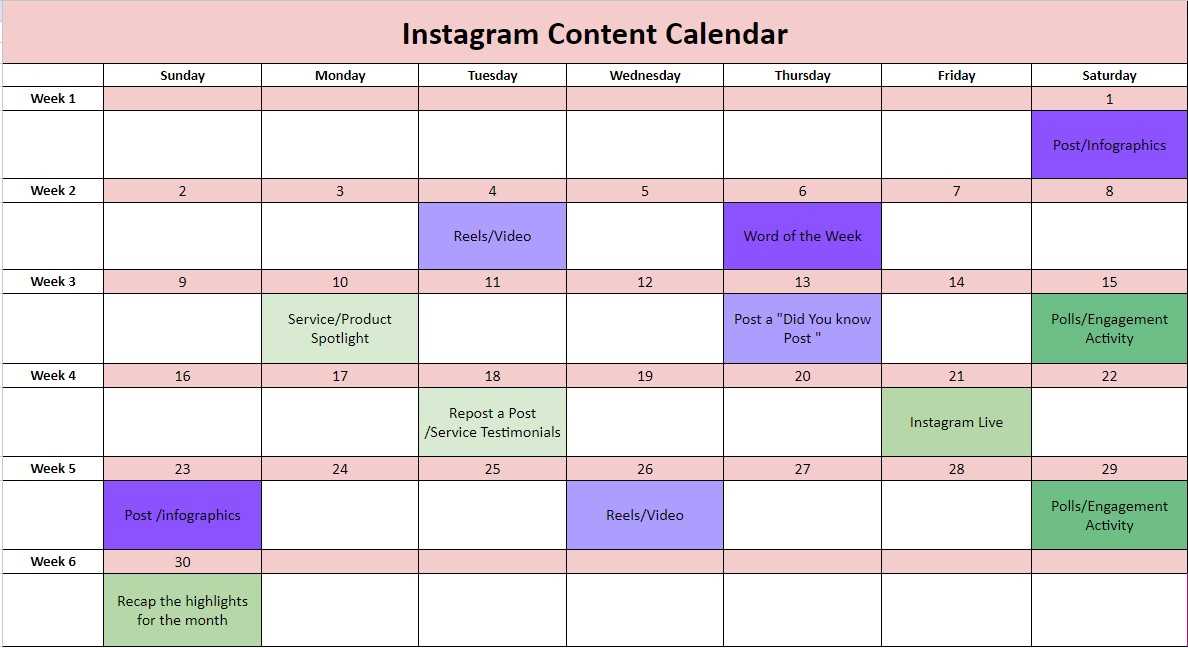
Here's an example of what a content planning calendar might look like:
| Date | Content Type | Topic | Status |
|---|---|---|---|
| March 1 | Blog Post | "5 Ways to Boost Your Productivity" | Scheduled |
| March 8 | Social Media Post | "Happy International Women's Day" | Draft |
| March 15 | Video | "How to Create a Content Planning Calendar" | In Production |
Tips for Success
Here are a few additional tips to help you get the most out of your content planning calendar:
Be flexible: Don't be too hard on yourself if you need to make changes to your calendar. Life happens, and things don't always go as planned.
Review and adjust: Regularly review your calendar and adjust as needed. This will help you stay on track and ensure that your content is aligned with your goals.
Use a template: Consider using a template to help you plan your content. This could be a simple outline or a more detailed template with space for notes and ideas.
Common Mistakes to Avoid
Here are a few common mistakes to avoid when creating a content planning calendar:
Not being specific: Don't just list "content" as a task. Be specific about what type of content you're creating and what you want to achieve.
Not leaving space for spontaneity: While it's good to have a plan, don't leave no room for spontaneity. Leave some space in your calendar for unexpected ideas or opportunities.
Not reviewing and adjusting: Regularly review your calendar and adjust as needed. This will help you stay on track and ensure that your content is aligned with your goals.
FAQs
Here are a few frequently asked questions about content planning calendars:
Q: How far in advance should I plan my content? It depends on your needs and goals. Some people like to plan their content a month in advance, while others prefer to plan a quarter or even a year in advance.
Q: What if I need to make changes to my calendar?
Don't worry! Just adjust your calendar as needed. Remember to review and adjust your calendar regularly to ensure that it stays aligned with your goals.
- Q: Can I use a content planning calendar for social media?
Absolutely! A content planning calendar can be used for all types of content, including social media.
Conclusion
Creating a content planning calendar takes some effort upfront, but it can pay off in the long run. By taking the time to plan and organize your content, you can reduce stress, increase productivity, and improve the quality of your content. Remember to be flexible, review and adjust your calendar regularly, and avoid common mistakes. With these tips and a little practice, you'll be well on your way to creating a content planning calendar that works for you.
