
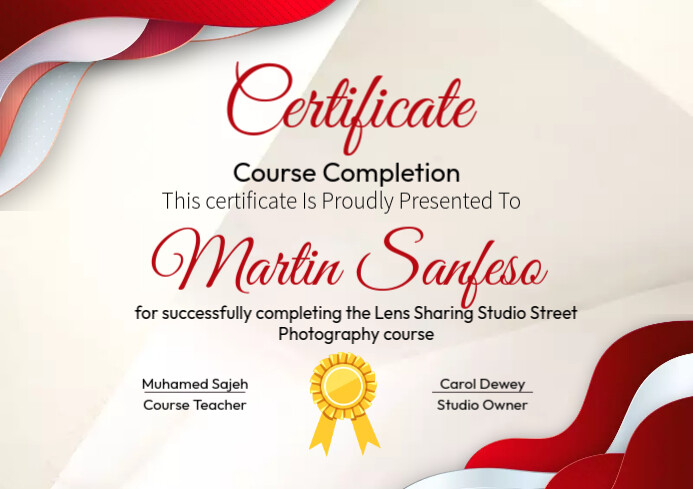
Why Online Course Certificate Templates Matter
In the competitive world of online education, providing a high-quality learning experience is just the beginning. As an educator or course creator, you want to reward your students' hard work and dedication with a tangible recognition of their achievement. A well-designed online course certificate template can make a significant difference in how your students perceive the value of your course and your brand as a whole.
When students receive a professionally crafted certificate, they feel a sense of pride and accomplishment. This, in turn, can lead to increased student satisfaction, positive word-of-mouth, and even encourage them to share their achievement on social media, generating buzz about your course and brand.

Key Elements of a Great Online Course Certificate Template
So, what makes an online course certificate template great? Here are some essential elements to consider:
Clear and concise information: Include the student's name, course title, completion date, and your brand's name and logo.
Professional design: Choose a clean, modern, and visually appealing design that aligns with your brand's identity.
Customizable fields: Make it easy to update student information and course details by including customizable fields.
Security features: Consider adding a unique identifier, such as a serial number or QR code, to prevent tampering and ensure authenticity.
Design Tips for Creating a Stunning Online Course Certificate Template
When designing your online course certificate template, keep the following tips in mind:
Keep it simple and elegant: Avoid clutter and focus on the essential information.
Use a standard font: Stick to a standard font, such as Arial, Calibri or Helvetica, to ensure readability.
Choose a color scheme: Select a color scheme that aligns with your brand's identity and is visually appealing.
Add a logo: Include your brand's logo to reinforce your identity and create a professional look.

Benefits of Using Digital Certificates
Digital certificates offer several benefits over traditional paper-based certificates. Here are a few:
Comparison of Digital and Traditional Certificates
| <strong>Feature</strong> | <strong>Digital Certificates</strong> | <strong>Traditional Certificates</strong> |
|---|---|---|
| <strong>Security</strong> | Tamper-evident and secure | Can be easily forged or lost |
| <strong>Convenience</strong> | Easily shareable and storable | Physical storage required |
| <strong>Cost-effective</strong> | Reduced printing and shipping costs | Printing and shipping costs apply |
How to Create and Distribute Online Course Certificate Templates
To create and distribute online course certificate templates, you'll need to:
- Design your template: Use a design tool, such as Canva or Adobe Illustrator, to create your template.
- Save as a PDF: Save your template as a PDF to ensure it can be easily shared and printed.
- Use an LMS or certificate tool: Utilize a Learning Management System (LMS) or a dedicated certificate tool to automate the certificate generation and distribution process.
Best Practices for Issuing Online Course Certificates
To ensure the integrity and value of your online course certificates, follow these best practices:
Verify student completion: Confirm that students have completed the course requirements before issuing a certificate.
Use a unique identifier: Include a unique identifier, such as a serial number or QR code, to prevent tampering and ensure authenticity.
- Keep records: Maintain a record of issued certificates, including student information and certificate details.
Frequently Asked Questions
Q: What is the best format for an online course certificate template?
A PDF format is recommended, as it can be easily shared, printed, and secured.
Q: Can I customize my online course certificate template?
Yes, consider using a template with customizable fields to make it easy to update student information and course details.
Q: How do I prevent certificate tampering?
Consider adding a unique identifier, such as a serial number or QR code, to prevent tampering and ensure authenticity.
Q: Can I use a digital signature on my online course certificate template?
Yes, a digital signature can add an extra layer of security and authenticity to your certificates.
Conclusion
Creating a professional online course certificate template is a thoughtful way to show your students that you value their hard work and dedication. By incorporating the essential elements, design tips, and best practices outlined in this guide, you can create a stunning certificate that enhances your brand reputation and adds value to your courses. Take the time to invest in a high-quality certificate template, and watch your students' satisfaction and loyalty grow.
Related: 5 Useful Things to Know About Online Learning Website
Related: Simple Email Marketing Tools: What Actually Makes Sense?
