
Introduction
When it comes to job hunting, your resume is often the first impression you make on a potential employer. With so many qualified candidates vying for the same positions, it's crucial to make your CV stand out from the crowd. One way to do this is by using a customizable resume template online. In this article, we'll explore the benefits of using online resume templates, and provide a step-by-step guide on how to customize them to showcase your skills and experience.
Choosing the Right Template
With countless online resume builders and templates available, selecting the right one can be overwhelming. Here are a few factors to consider:
Industry: Different industries have different norms when it comes to resume design and layout. For example, a creative field like graphic design or writing may allow for more innovative templates, while a traditional industry like finance or law may require a more conservative approach.
Level of experience: If you're just starting your career, a simple and clean template can help you stand out. On the other hand, if you have years of experience, a more detailed template can help you showcase your achievements.
Personal style: Your resume should reflect your personality and brand. Choose a template that aligns with your personal style and is visually appealing.
Some popular online resume builders include:
Canva
Resume.io
LinkedIn Resume Builder
Google Docs Resume Templates
Customizing Your Template
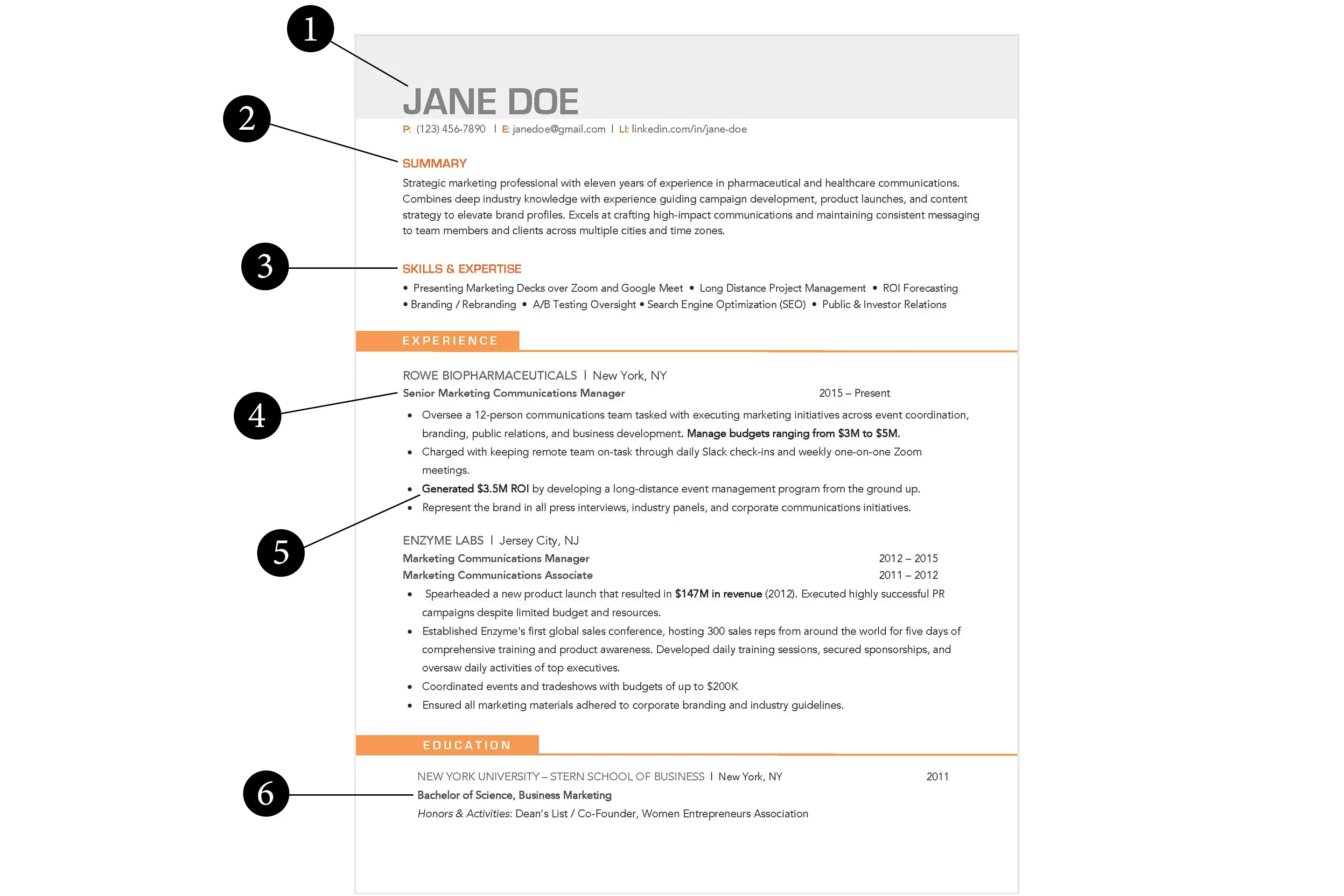
Once you've chosen a template, it's time to customize it. Here are the key sections to focus on:
Contact Information
Make sure your contact information is up-to-date and professional. Include:
Full name
Email address
Phone number
LinkedIn profile (or other professional social media)
Address (optional)
Professional Summary
Your professional summary, also known as a career objective or personal statement, should provide a brief overview of your experience, skills, and career goals. Tailor this section to the specific job you're applying for, and highlight your unique value proposition.
Work Experience
When listing your work experience, focus on achievements and accomplishments rather than just job responsibilities. Use specific numbers and metrics to demonstrate the impact you've made in your previous roles.
Education
List your educational background in reverse chronological order, with your most recent degree or certification first. Include:
Degree
Field of study
University
Graduation date
Skills
Create a separate section for your skills, and categorize them into:
Technical skills (e.g., programming languages, software proficiency)
Soft skills (e.g., communication, teamwork, leadership)

Design and Layout Tips
Here are some design and layout tips to keep in mind:
Use a clear and concise font: Stick to standard fonts like Arial, Calibri or Helvetica.
Choose a consistent color scheme: Select 2-3 colors that align with your personal brand and use them throughout the resume.
Use bullet points and white space effectively: Break up large blocks of text with bullet points and white space to make your resume easy to scan.
Common Mistakes to Avoid
Here are some common mistakes to avoid when customizing your resume template:
Typos and grammatical errors: Proofread your resume multiple times to catch any mistakes.
Inconsistent formatting: Use a consistent font, spacing, and formatting throughout the resume.
Lack of relevance: Tailor your resume to the specific job you're applying for, and highlight your relevant skills and experience.
FAQs
Here are some frequently asked questions about customizing resume templates online:
Q: What is the best online resume builder?
The best online resume builder for you will depend on your specific needs and preferences. Some popular options include Canva, Resume.io, and LinkedIn Resume Builder.
Q: How do I choose a resume template?
Choose a resume template that aligns with your industry, level of experience, and personal style.
Q: What should I include in my professional summary?
Your professional summary should provide a brief overview of your experience, skills, and career goals. Tailor this section to the specific job you're applying for, and highlight your unique value proposition.
Q: How do I make my resume stand out?
Use a clear and concise font, choose a consistent color scheme, and use bullet points and white space effectively. Also, focus on achievements and accomplishments rather than just job responsibilities.
Conclusion
Customizing a resume template online can help you create a standout CV that showcases your skills and experience. By choosing the right template, customizing it to fit your needs, and avoiding common mistakes, you can increase your chances of landing an interview and achieving your career goals. Take the time to experiment with different templates and designs, and don't be afraid to try new things. With a little creativity and effort, you can create a resume that truly reflects your personal brand and helps you stand out in a competitive job market.
Related: Online Course Outline Template
Related: A Practical Guide to Choosing the Best Online Course Website
Related: What to Know About Free Course Template Downloads
Related: 5 Useful Things to Know About Email Marketing Tools
