
Getting Started with Free Design Tools
As a creator, you know that having great ideas is only half the battle. Bringing those ideas to life with compelling visual content is what sets you apart. But, professional design software can be pricey. That's where free design tools online come in – a game-saver for those on a budget or just starting out. With a little creativity and the right tools, you can produce high-quality visual content without spending a dime.
Exploring Graphic Design Options
When it comes to graphic design, there are many free tools that can help you create stunning visuals. Here are a few options:
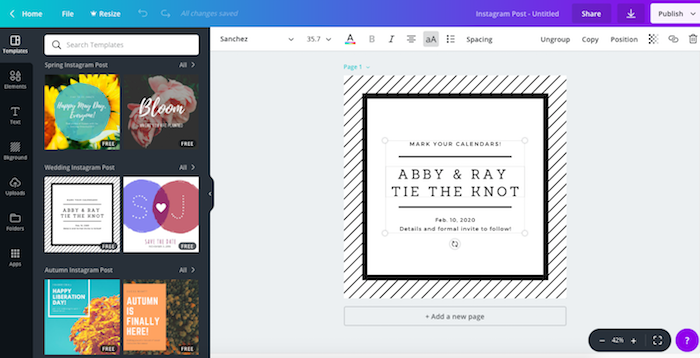
Canva: A popular choice for non-designers and professionals alike, Canva offers a wide range of templates, fonts, and design elements. Its drag-and-drop interface makes it easy to use, even for those without extensive design experience.
GIMP: For those who want more advanced features, GIMP (GNU Image Manipulation Program) is a free and open-source raster graphics editor. It offers many of the same features as Adobe Photoshop, including layers, filters, and effects.
Vectr: A free vector graphics editor, Vectr is great for creating logos, icons, and other scalable graphics. Its intuitive interface and robust feature set make it a great option for designers of all levels.
Choosing the Right Tool for the Job
With so many options available, it can be hard to choose the right tool for your design needs. Here's a quick comparison:
| Tool | Best for | Features |
|---|---|---|
| Canva | Non-designers, beginners | Templates, drag-and-drop interface, vast font library |
| GIMP | Advanced users, photo editing | Layers, filters, effects, customizable interface |
| Vectr | Vector graphics, logos, icons | Scalable graphics, intuitive interface, robust feature set |
Diving into Digital Art
If you're more interested in digital art, there are plenty of free tools to help you get creative:
Krita: A free and open-source digital painting and illustration software, Krita offers a wide range of brush engines, including customizable brushes and textures.
Autodesk Sketchbook: A free drawing and painting software, Autodesk Sketchbook offers a clean and intuitive interface, making it perfect for artists of all levels.
Blender: A free 3D creation software, Blender offers modeling, rigging, animation, rendering, and even video editing.
Creating Visual Content for Social Media
When it comes to creating visual content for social media, it's all about efficiency and consistency. Here are a few tips:
Use templates: Many free design tools offer pre-made templates for social media graphics, making it easy to create consistent visual content.
Keep it simple: Don't feel like you need to create something elaborate. Simple graphics with bold text and bright colors can be just as effective.
Experiment with fonts: Fonts can make or break a design. Experiment with different fonts and font combinations to find what works best for your brand.
Advanced Features and Customization
While free design tools can be incredibly powerful, sometimes you need a little more. Here are a few ways to take your designs to the next level:
Custom fonts: Many free design tools allow you to upload custom fonts, giving you even more flexibility.
Integrations: Some free design tools offer integrations with other apps and services, making it easy to streamline your workflow.
Tutorials and resources: Look for free design tools with extensive tutorials and resources, helping you get the most out of the software.
Real-World Applications
But don't just take our word for it – here are a few real-world examples of how free design tools can be used:
Small business owners: Use free design tools to create social media graphics, flyers, and brochures to promote your business.
Social media influencers: Use free design tools to create consistent visual content and elevate your brand.
- Artists and creatives: Use free design tools to explore new mediums and bring your ideas to life.
Frequently Asked Questions
Q: Are free design tools really free?
Yes, but some may offer optional paid upgrades or subscriptions for additional features or support.
Q: Can I use free design tools for commercial projects?
It depends on the tool and its licensing terms. Be sure to check the terms of use before using a free design tool for commercial projects.
Q: Are free design tools as good as paid ones?
While paid design tools often offer more advanced features and support, many free design tools can produce high-quality results with a little creativity and practice.
Q: Can I use free design tools on a mobile device?
Many free design tools offer mobile apps or mobile-friendly interfaces, making it easy to create visual content on-the-go.
Conclusion
Free design tools online have come a long way, offering a wide range of features and capabilities that can help you create stunning visual content without breaking the bank. Whether you're a seasoned designer or just starting out, there's a free design tool out there for you. So why wait? Start exploring and bring your ideas to life.
Related: Crafting a Winning Remote Work Resume: A Template Guide
Related: What to Know About Free Email Marketing Tools Online
Related: 5 Useful Things to Know About Free Email Marketing Tools
