
Unleashing Creativity with Free Design Tools
The world of design has become increasingly accessible, thanks to a plethora of free design tools available online. These tools have democratized design, empowering individuals and businesses to create stunning visuals without the hefty price tag of professional design software. In this article, we'll explore some of the best free design tools online, their features, and the tradeoffs that come with using them.
Graphic Design on a Budget
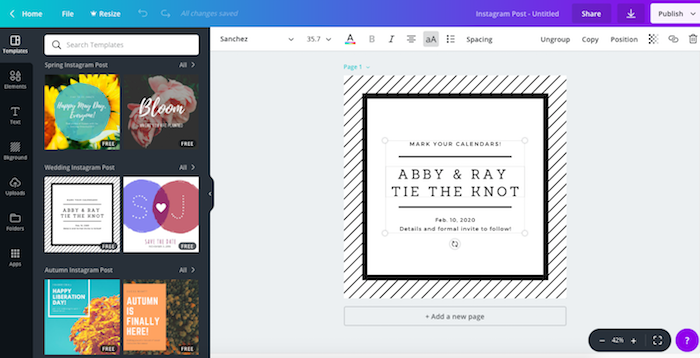
graphic design is one of the most sought-after skills in the digital landscape. With free design tools like Canva, GIMP, and Inkscape, creating professional-looking graphics has become more achievable than ever. Canva, a popular choice among non-designers and professionals alike, offers a vast template library, an intuitive interface, and a wide range of design elements.
Canva: The People's Champ
Canva's appeal lies in its ease of use and extensive library of templates, fonts, and graphics. It's perfect for creating social media posts, presentations, and marketing materials. However, its free version comes with limitations, such as watermarks on some templates and limited export options.
Diving Deeper: GIMP and Inkscape
For those looking for more advanced features, GIMP (GNU Image Manipulation Program) and Inkscape are excellent alternatives. GIMP, often considered the free alternative to Adobe Photoshop, offers a wide range of editing tools and supports plugins. Inkscape, on the other hand, is a powerful vector graphics editor, rivaling Adobe Illustrator.
Comparison Time
| <strong>Tool</strong> | <strong>Key Features</strong> | <strong>Best for</strong> | <strong>Limitations</strong> |
|---|---|---|---|
| Canva | Templates, easy interface, wide design elements | Non-designers, quick designs, social media graphics | Watermarks, limited export options in free version |
| GIMP | Advanced editing tools, plugin support | Photo editing, raster graphics | Steep learning curve |
| Inkscape | Vector graphics, powerful editing tools | Illustrations, vector graphics, logos | Limited compatibility with certain file formats |
Web Design and Prototyping
Web design is another area where free tools shine. Platforms like Figma, Adobe XD's free version, and Webflow offer robust features for designing and prototyping websites. Figma stands out for its collaborative features, allowing teams to work on designs simultaneously.
Figma: Collaboration at Its Core
Figma's strength lies in its cloud-based collaboration capabilities. It allows multiple users to work on a design project in real-time, making it an excellent choice for teams. However, its free version limits projects and features compared to the paid plans.

Digital Art and Illustration
For digital artists, free tools like Krita and FireAlpaca offer a range of brushes and tools to create stunning artworks. Krita, in particular, has gained popularity for its extensive brush engine and support for HDR and 4K monitors.
Choosing the Right Tool
With so many options available, choosing the right tool can be daunting. Consider what you need to create and your level of expertise. For beginners, user-friendly tools like Canva might be the best starting point. For more advanced needs, GIMP, Inkscape, or Krita might offer the necessary features.
Practical Tips for Getting Started
- Start Simple: Begin with basic tools like Canva to get a feel for design.
- Experiment: Try different tools to see which one fits your needs best.
- Watch Tutorials: Leverage online resources and tutorials to learn new skills.
- Join Communities: Engage with design communities for feedback and inspiration.
Trusting the Process
It's natural to feel overwhelmed by the array of choices. However, by understanding your needs and experimenting with different tools, you'll find the perfect fit. The key is to enjoy the process and continuously improve your skills.
Frequently Asked Questions
Q: Are free design tools really free?
Yes, but some offer premium features or have limitations in their free versions.
Q: Can I use free design tools for commercial projects?
It depends on the tool's licensing terms. Always check the terms of use.
Q: Are free design tools suitable for professional use?
Absolutely. Many professionals use free tools for certain tasks, especially when on a budget.
Q: How do I learn to use these tools?
Start with official tutorials and online courses. Practice is key.
Elevating Your Design Game
Free design tools online have made it possible for anyone to create stunning visuals. By understanding the strengths and limitations of each tool, you can make informed choices and elevate your design game. Whether you're a beginner or a seasoned designer, there's a free tool out there for you. So, dive in, explore, and let your creativity shine.
Related: 5 Easy Free Design Tools to Elevate Your Visuals
Related: Content Calendar Template Free: What Actually Makes Sense?
