

Choosing the Right Free Resume Template
When you're new to the job market, creating a strong resume can seem daunting. One of the best places to start is with a free resume template. These templates are designed to help you structure your resume in a clear and professional way, saving you time and effort. But with so many options available, how do you choose the right one?
The key is to select a template that aligns with your industry and experience level. For example, if you're applying for a creative field, you might want a template that allows for more design flexibility. On the other hand, if you're going for a corporate job, a clean and straightforward template might be more suitable.
Understanding Resume Basics
Before you start browsing through free resume templates, it's essential to understand the basics of resume writing. A typical resume includes:
- Contact Information: Your name, email address, phone number, and LinkedIn profile (if applicable).
- Professional Summary: A brief overview of your skills, experience, and career goals.
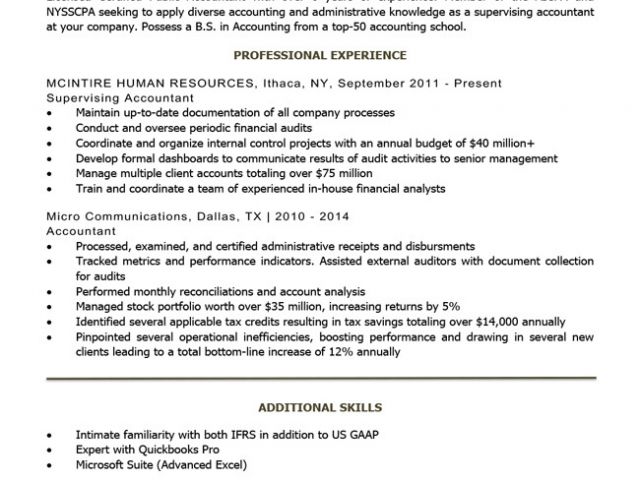
- Work Experience: A reverse-chronological list of your work experience, with a focus on achievements and responsibilities.
- Education: Your educational background, including degrees and relevant courses.
- Skills: A list of your relevant skills, both hard and soft.
Top Free Resume Templates for Beginners
Here are some popular free resume templates that are perfect for beginners:
- Google Docs Templates: Google offers a variety of free resume templates that you can access directly from Google Docs. These templates are clean, easy to use, and compatible with different devices.
- Microsoft Word Templates: Microsoft Word provides a range of free resume templates that you can download and customize. These templates are great for those who are familiar with Microsoft Office.
- Canva Templates: Canva is a popular design platform that offers a wide range of free resume templates. These templates are perfect for those who want to add a creative touch to their resume.
Customizing Your Resume Template
Once you've chosen a template, it's time to customize it. Here are some tips:
- Tailor Your Objective: Make sure your professional summary aligns with the job you're applying for.
- Highlight Your Achievements: Instead of just listing your job responsibilities, focus on the achievements and results you've achieved in your previous roles.
- Keep it Concise: Keep your resume to one or two pages, and use clear and concise language.
Comparison of Free Resume Templates
| Template Provider | Ease of Use | Customization Options | Industry Suitability |
|---|---|---|---|
| Google Docs | Easy | Limited | Corporate, Education |
| Microsoft Word | Easy | High | Corporate, Finance |
| Canva | Medium | High | Creative, Marketing |
"The key to a great resume is not just about using a template, but about tailoring your content to the job you're applying for. Remember, your resume is often the first impression you make on a potential employer, so make it count."
Practical Tips for Using Free Resume Templates
- Use Keywords: Many companies use applicant tracking systems (ATS) to screen resumes before they even reach a human recruiter. Use keywords from the job description to increase your chances of getting past the ATS.
- Proofread: Typos and grammatical errors can make a negative impression on potential employers. Make sure to proofread your resume multiple times before submitting it.
- Get Feedback: Ask a friend or mentor to review your resume and provide feedback.
Common Mistakes to Avoid
- Generic Resumes: Avoid using a generic resume for every job application. Instead, tailor your resume to each job you apply for.
- Lack of Action Verbs: Use action verbs like "managed," "created," and "developed" to describe your achievements.
- Poor Formatting: Make sure your resume is well-formatted and easy to read.
FAQs
Q: What is the best free resume template for a beginner?
The best free resume template for a beginner depends on the industry you're applying to and your level of experience. Google Docs and Microsoft Word templates are great for corporate jobs, while Canva templates are perfect for creative fields.
Q: How do I customize a free resume template?
To customize a free resume template, start by replacing the placeholder text with your own information. Then, adjust the formatting and layout to fit your needs.
Q: Can I use a free resume template for a job application?
Yes, you can use a free resume template for a job application. Just make sure to customize it to fit the job you're applying for and proofread it multiple times.
Q: How do I make my resume stand out?
To make your resume stand out, focus on your achievements and results, use keywords from the job description, and use a clear and concise format.
Final Tips for Success
Creating a strong resume is just the first step in your job search. Here are some final tips to keep in mind:
- Network: Attend job fairs, industry events, and networking sessions to meet people in your field.
- Practice Your Interview Skills: Prepare answers to common interview questions and practice your responses with a friend or mentor.
- Stay Positive: Job hunting can be tough, but stay positive and focused on your goals.
By following these tips and using a free resume template, you'll be well on your way to landing your dream job.
