

Why You Need a Workout Plan Template
Creating a workout plan can be overwhelming, especially for those new to fitness. You might find yourself wondering where to start, what exercises to do, and how to track your progress. A well-structured workout plan template can be a game-changer, providing a clear roadmap to achieving your fitness goals. In this article, we'll explore the benefits of using a free workout plan template in Excel and provide a step-by-step guide on how to create your own.
Benefits of Using a Workout Plan Template in Excel
Using a workout plan template in Excel offers several advantages. Firstly, it's a cost-effective solution, as you can create your own template without spending a fortune on expensive fitness software. Secondly, Excel provides a high level of flexibility, allowing you to customize your template to suit your specific needs. Here are some benefits of using a workout plan template in Excel:
Easy to use: Excel is a widely used spreadsheet software, making it easy to find resources and tutorials online.
Customizable: You can tailor your template to fit your fitness goals, schedule, and preferences.
Track progress: Excel allows you to track your progress over time, making it easier to stay motivated and adjust your plan as needed.
Creating Your Free Workout Plan Template in Excel
Creating a workout plan template in Excel is a straightforward process. Here's a step-by-step guide to get you started:
Step 1: Define Your Fitness Goals
Before creating your template, it's essential to define your fitness goals. What do you want to achieve through your workout plan? Do you want to lose weight, build muscle, or increase endurance? Having clear goals in mind will help you create a focused and effective workout plan.
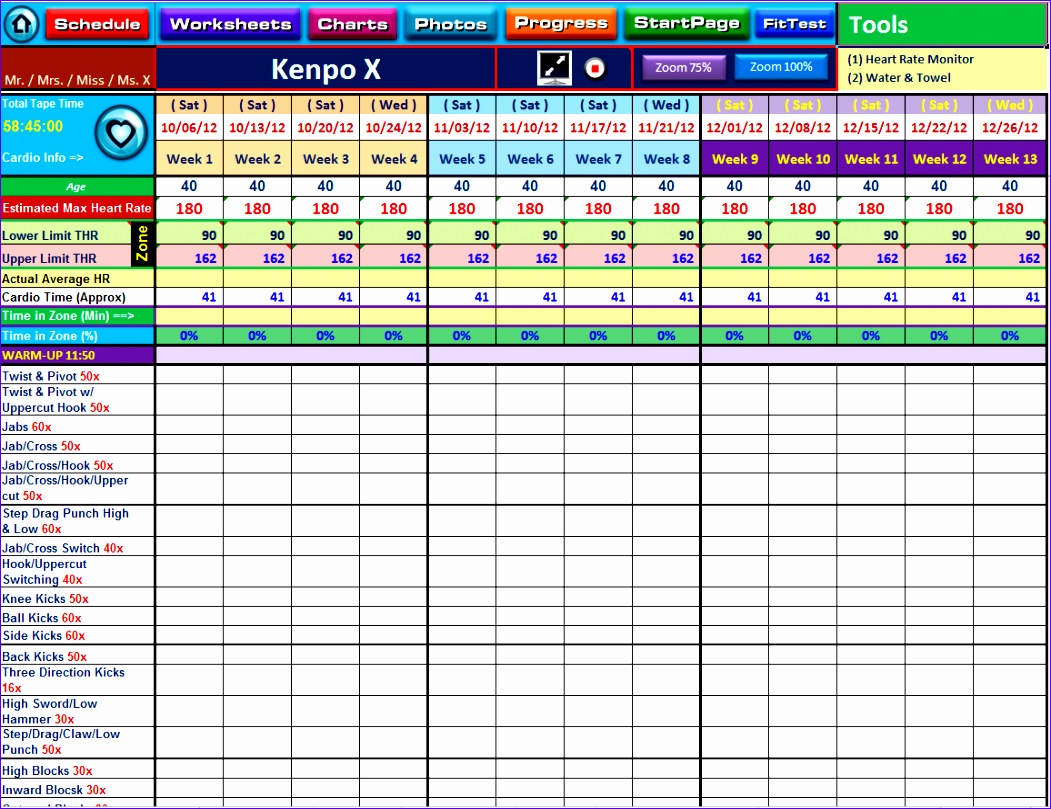
Step 2: Choose Your Template Structure
You can choose from various template structures, depending on your preferences. Here are a few options:
Daily workout template: Focus on a single day's workout, including exercises, sets, reps, and weight.
Weekly workout template: Plan your workouts for the entire week, including rest days and cardio sessions.
Monthly workout template: Create a long-term plan, outlining your fitness goals and progress over several weeks or months.
Step 3: Set Up Your Excel Template
Once you've decided on your template structure, it's time to set up your Excel template. Here's a basic outline to get you started:
| <strong>Column</strong> | <strong>Description</strong> |
|---|---|
| Exercise | List of exercises to perform |
| Sets | Number of sets for each exercise |
| Reps | Number of repetitions for each exercise |
| Weight | Weight or resistance to use |
| Rest | Rest time between sets |
Step 4: Customize Your Template
Now it's time to customize your template to fit your specific needs. You can add or remove columns, depending on your requirements. Here are some ideas:
Add a progress tracking section: Include a section to track your progress over time, such as weight lifted, reps completed, or workout duration.
Include a notes section: Add a section for notes, allowing you to record any comments or observations about your workouts.
Example Workout Plan Template
Here's an example of a basic workout plan template in Excel:
| <strong>Exercise</strong> | <strong>Sets</strong> | <strong>Reps</strong> | <strong>Weight</strong> | <strong>Rest</strong> |
|---|---|---|---|---|
| Squats | 3 | 8-12 | 100 lbs | 60 sec |
| Lunges | 3 | 8-12 | 80 lbs | 60 sec |
| Leg Press | 3 | 10-15 | 150 lbs | 90 sec |
Tips for Using Your Workout Plan Template
Here are some tips to help you get the most out of your workout plan template:
Be consistent: Stick to your workout plan as much as possible, making adjustments as needed.
Track your progress: Regularly track your progress, using your template to monitor changes in your fitness level.
Mix it up: Vary your workout routine to avoid plateaus and prevent overuse injuries.
Common Mistakes to Avoid
When creating and using a workout plan template, there are several common mistakes to avoid:
Not setting clear goals: Failing to define your fitness goals can lead to a lack of focus and motivation.
Not tracking progress: Neglecting to track your progress can make it difficult to adjust your plan and stay motivated.
Not being consistent: Inconsistent workouts can lead to poor results and a higher risk of injury.
Frequently Asked Questions
Q: What is a workout plan template, and why do I need one?
A workout plan template is a structured plan outlining your exercises, sets, reps, and weight. It helps you stay organized, focused, and motivated, ensuring you achieve your fitness goals.
Q: How do I create a workout plan template in Excel?
To create a workout plan template in Excel, define your fitness goals, choose a template structure, set up your Excel template, and customize it to fit your needs.
Q: What are the benefits of using a workout plan template in Excel?
Using a workout plan template in Excel offers several benefits, including ease of use, customizability, and progress tracking.
Q: How often should I update my workout plan template?
You should update your workout plan template regularly, ideally every 4-6 weeks, to reflect changes in your fitness level and goals.
Conclusion
A free workout plan template in Excel can be a powerful tool in achieving your fitness goals. By providing a structured plan, tracking progress, and offering flexibility, a well-designed template can help you stay motivated and focused. By following the steps outlined in this article, you can create your own workout plan template and start achieving your fitness goals today.
Related: What to Know About Creating a Free Workout Plan Template
Related: A Practical Guide to Creating a Workout Planner Template
Related: A Practical Guide to Choosing the Right Pet Health Care Plan
Related: 5 Useful Things to Know About Cheap Healthy Meal Prep Ideas
