
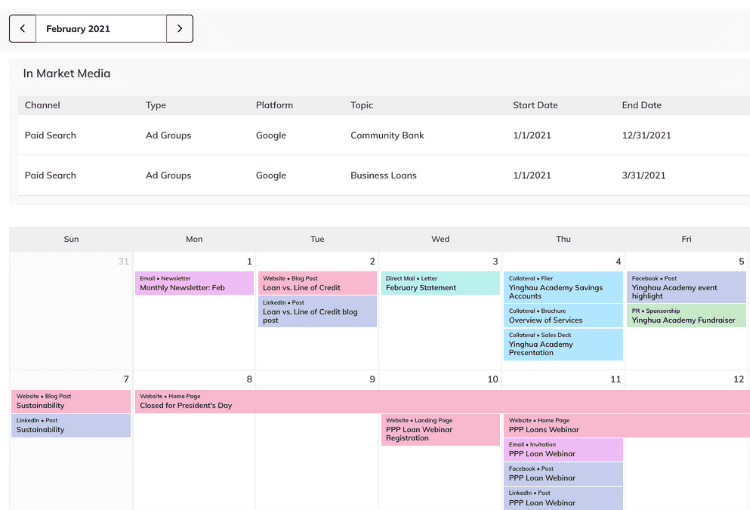
Understanding Marketing Calendar Software
Marketing calendar software is designed to help teams plan, organize, and execute marketing campaigns more efficiently. These tools provide a centralized platform for managing marketing activities, tracking progress, and collaborating with team members. With the right software, you can streamline your marketing planning process, reduce confusion, and improve overall productivity.
Assessing Your Marketing Needs
Before selecting a marketing calendar software, it's essential to assess your team's specific needs. Consider the following factors:
What are your primary marketing goals?
What types of campaigns do you run most frequently?
How many team members will be using the software?
What is your budget for marketing software?
By understanding your marketing needs, you can identify the features and functionalities that are most important to your team. For example, if you're a small business with limited resources, you may prioritize affordability and ease of use. On the other hand, larger enterprises may require more advanced features, such as integration with existing systems and customizable workflows.
Key Features to Look for in Marketing Calendar Software
When evaluating marketing calendar software, look for the following key features:
Campaign planning and management: The ability to plan, organize, and track marketing campaigns across multiple channels.
Collaboration and workflow management: Features that enable team members to collaborate, assign tasks, and track progress.
Integration with existing systems: The ability to integrate with other marketing tools, such as CRM systems, email marketing software, and social media management platforms.
Customization and flexibility: The ability to customize the software to meet your team's specific needs and workflows.
Reporting and analytics: Features that provide insights into campaign performance and team productivity.
Comparison of Popular Marketing Calendar Software
The following table compares some popular marketing calendar software:
| Software | Key Features | Pricing |
|---|---|---|
| Asana | Campaign planning, collaboration, workflow management | $19.99/user/month |
| Trello | Visual project management, collaboration, integration with existing systems | $12.50/user/month |
| CoSchedule | Marketing calendar, campaign planning, team collaboration | $29/user/month |
| Wrike | Project management, collaboration, workflow management | $24.80/user/month |
Implementation and Adoption Strategies
Implementing marketing calendar software requires careful planning and execution. Here are some strategies to ensure successful adoption:
Provide training and support: Offer comprehensive training and ongoing support to ensure team members understand how to use the software effectively.
Start small: Begin with a small pilot project to test the software and identify any potential issues.
Customize the software: Tailor the software to meet your team's specific needs and workflows.
Monitor progress and adjust: Continuously monitor team progress and adjust your workflows as needed.

Overcoming Common Challenges
Implementing marketing calendar software can be challenging, but there are ways to overcome common obstacles:
Resistance to change: Communicate the benefits of the software and provide training to ensure team members feel comfortable using the new tool.
Integration issues: Work closely with the software provider to ensure seamless integration with existing systems.
Limited resources: Prioritize features and functionalities that align with your team's most pressing needs.
Real-World Example: CoSchedule
CoSchedule is a popular marketing calendar software that has helped numerous teams streamline their marketing planning and execution. Here's an example of how CoSchedule helped a marketing team improve their productivity:
"We were using a spreadsheet to manage our marketing campaigns, but it was becoming increasingly difficult to keep track of everything. CoSchedule has allowed us to centralize our marketing planning and execution, and we've seen a significant increase in productivity and team collaboration." - Marketing Manager, XYZ Corporation

FAQs
Q: What is the best marketing calendar software for small businesses?
The best marketing calendar software for small businesses depends on specific needs and budget. Popular options include CoSchedule, Asana, and Trello.
Q: How do I choose the right marketing calendar software for my team?
Assess your team's specific needs, evaluate key features, and compare popular software options to find the best fit.
Q: Can marketing calendar software integrate with existing systems?
Yes, many marketing calendar software options integrate with existing systems, such as CRM systems, email marketing software, and social media management platforms.
Conclusion
Choosing the right marketing calendar software can have a significant impact on your team's productivity and marketing performance. By understanding your marketing needs, evaluating key features, and comparing popular software options, you can find the best tool for your team. Remember to prioritize implementation and adoption strategies, and don't hesitate to reach out to the software provider for support. With the right marketing calendar software, you can streamline your marketing planning and execution, and achieve your marketing goals more efficiently.
Related: Mastering Free Email Marketing Tools for Beginners
Related: What to Know About Choosing the Best Website Builder
Related: 5 Useful Things to Know About Freelancing Online Successfully
