

Reducing PDF file size is a common challenge many of us face. Whether you're trying to email a large document, upload it to a website, or simply save storage space, dealing with bulky PDFs can be frustrating. The good news is that reducing PDF file size is easier than you think, and there are several methods to do it without compromising the quality of your document.
Understanding PDF File Size
Before we dive into the solutions, it's essential to understand what contributes to a PDF's file size. PDFs can be large due to various factors, including:
High-resolution images
Embedded fonts
Graphics and illustrations
Text and formatting
The type of content and its quality directly impact the file size. For instance, a PDF with high-resolution images will be larger than one with low-resolution images.
Methods to Reduce PDF File Size
There are several methods to reduce PDF file size, ranging from using online tools to optimizing PDFs manually. Here are some of the most effective ways:
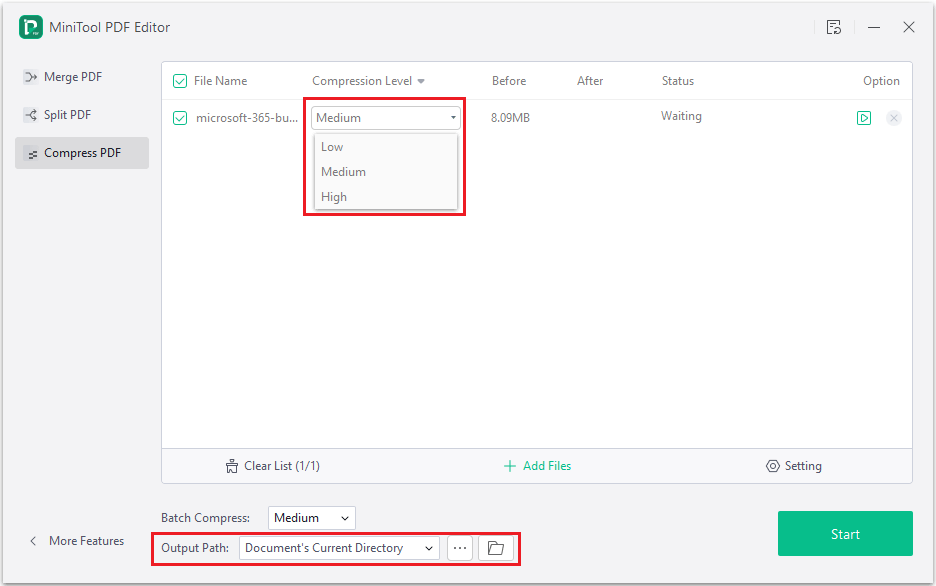
Using Online PDF Compression Tools
Online PDF compression tools are a quick and easy way to reduce PDF file size. These tools use algorithms to compress the PDF without affecting its quality. Some popular online tools include:
SmallPDF
PDFCompressor
CompressPDF
These tools are free, easy to use, and can compress PDFs quickly. However, be cautious when using online tools, as they may have limitations on file size and quality.
Using Desktop PDF Editors
Desktop PDF editors, such as Adobe Acrobat, offer more advanced features to optimize PDFs. These editors allow you to:
Reduce image resolution
Remove embedded fonts
Compress graphics and illustrations
Adobe Acrobat, for instance, has a built-in feature to optimize PDFs for web use, which can significantly reduce file size.

Optimizing PDFs Manually
If you're looking for a more hands-on approach, you can optimize PDFs manually by:
Resizing images before adding them to the PDF
Using font embedding tools to reduce font size
Removing unnecessary graphics and illustrations
This method requires more technical expertise, but it gives you more control over the optimization process.
Comparison of PDF Compression Methods
| Method | Ease of Use | Quality Loss | Cost |
|---|---|---|---|
| Online Tools | Easy | Minimal | Free/Paid |
| Desktop PDF Editors | Medium | Minimal | Paid |
| Manual Optimization | Hard | None | Free |
While online tools are easy to use, they may have limitations on file size and quality. Desktop PDF editors offer more advanced features but require a purchase. Manual optimization gives you control but requires technical expertise.
Best Practices for Reducing PDF File Size
To reduce PDF file size effectively, follow these best practices:
Use images with the correct resolution
Embed fonts only when necessary
Remove unnecessary graphics and illustrations
- Use PDF compression tools or editors
By following these best practices, you can significantly reduce PDF file size without compromising quality.
Case Study: Reducing PDF File Size for Email
Let's say you're trying to email a large PDF document to a client, but it's too big to attach. You can use an online PDF compression tool to reduce the file size. For instance, you can use SmallPDF to compress the PDF, which reduces the file size from 10MB to 2MB. This makes it easy to email the document without worrying about attachment limits.
Frequently Asked Questions
Q: How do I reduce the size of a PDF file without losing quality?
You can use online PDF compression tools, desktop PDF editors, or optimize PDFs manually to reduce file size without losing quality.
Q: What is the best tool to compress PDF files?
The best tool depends on your needs. Online tools like SmallPDF are easy to use, while desktop PDF editors like Adobe Acrobat offer more advanced features.
Q: Can I reduce PDF file size on a Mac?
Yes, you can use online tools or desktop PDF editors on a Mac to reduce PDF file size.
Q: How do I compress a PDF for email?
You can use online PDF compression tools or desktop PDF editors to compress a PDF before emailing it.
Conclusion
Reducing PDF file size is a common challenge, but it's easier than you think. By using online PDF compression tools, desktop PDF editors, or optimizing PDFs manually, you can significantly reduce file size without compromising quality. By following best practices and using the right tools, you can make your PDFs more manageable and efficient.
Related: What to Know About Free Templates for Small Business Plans
