

Finding Your Creative Footing: The Challenge of Design on a Budget
Creating visually stunning content without a hefty budget can seem like a daunting task. For individuals and small businesses, investing in professional design software can be a significant financial strain. However, with the rise of free design tools, achieving high-quality visual content has become more accessible than ever. The question now is not whether you can afford it, but which free tools will best serve your creative needs.
Exploring the Landscape of Free Design Tools
The ecosystem of free design tools is vast and varied, offering a range of functionalities from basic graphic design to advanced digital art. At the forefront are comprehensive platforms that provide a suite of tools capable of handling everything from logo creation to complex illustrations. Canva, for instance, has become a household name, offering a user-friendly interface and a vast library of templates and design elements.
However, the depth of features and the learning curve vary significantly across different tools. Some are designed with beginners in mind, offering drag-and-drop interfaces and extensive tutorial resources. Others cater to more experienced designers, providing advanced features like layer management, custom brushes, and effects.
A Deep Dive into Top Free Design Tools
Canva
Canva stands out for its accessibility and broad appeal. It offers a wide range of templates for various design needs, including social media graphics, presentations, and posters. Canva's drag-and-drop interface makes it easy for beginners to get started. While it does offer a paid version with additional features, the free version is remarkably robust.
GIMP
For those looking for a more traditional design experience, GIMP (GNU Image Manipulation Program) is a powerful free alternative to Adobe Photoshop. It offers a wide range of tools for photo editing and manipulation, including support for layers, filters, and effects. GIMP has a steeper learning curve than Canva but provides the depth of features professional designers need.
Inkscape
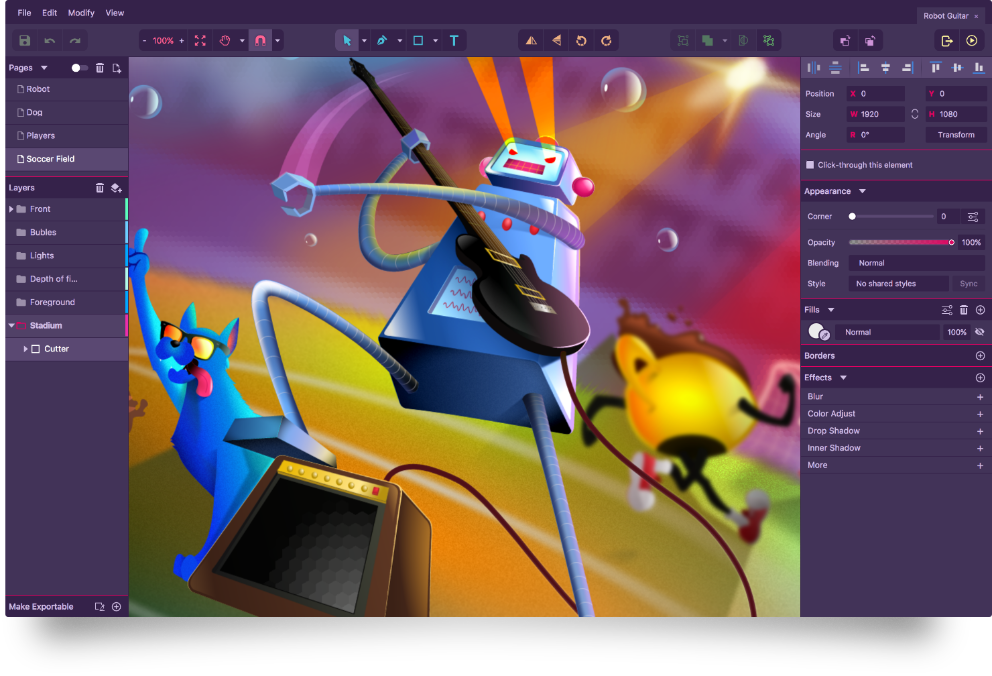
Inkscape is a free and open-source vector graphics editor, comparable to Adobe Illustrator. It's highly versatile, capable of handling complex illustrations, logos, and graphic designs. Inkscape supports advanced features like layers, paths, and shapes, making it a favorite among graphic designers.
Practical Applications and Tradeoffs
When choosing a free design tool, it's essential to consider your specific needs and skill level. For simple designs and quick edits, Canva might be your best bet. However, for more complex projects or professional-grade designs, GIMP or Inkscape might offer the necessary features.
Comparison Table: Features and Learning Curve
| Tool | Primary Use Case | Learning Curve | Key Features |
|---|---|---|---|
| Canva | General design, templates | Easy | Drag-and-drop, vast template library |
| GIMP | Photo editing, manipulation | Medium | Layers, filters, effects |
| Inkscape | Vector graphics, illustrations | Hard | Advanced vector tools |
Insights and Comparisons
Each of these tools has its strengths and weaknesses. Canva excels in ease of use and template variety but may lack in advanced feature depth. GIMP and Inkscape offer more sophisticated capabilities but require a greater time investment to master.
Trust Building: Community and Support
A crucial aspect of using free design tools is the community and support surrounding them. Canva, GIMP, and Inkscape all have active communities and extensive documentation. However, the depth of community engagement and the quality of support can vary. Canva's user base is vast, offering numerous user-created resources and forums. GIMP and Inkscape, being open-source, benefit from developer and user communities that contribute to their growth and provide support.
FAQs
Q: Are free design tools really free?
Yes, but with potential limitations. Most free design tools offer a basic version for free, with optional paid upgrades for additional features.
Q: Can I use free design tools for commercial projects?
Generally, yes, but check the licensing terms. Some free tools or resources within them may have restrictions on commercial use.
Q: Are free design tools suitable for professional use?
Absolutely. Tools like GIMP and Inkscape are used by professionals. However, the suitability depends on your specific needs and the tool's capabilities.
Q: How do I choose the right free design tool?
Consider your project's requirements, your design experience, and the tool's learning curve. Start with a tool that matches your skill level and meets your needs.
Closing
Navigating the world of free design tools doesn't have to be overwhelming. By understanding your needs and exploring the strengths of each tool, you can create stunning visual content without a significant financial investment. Whether you're a beginner looking for simplicity or a seasoned designer seeking advanced features, there's a free design tool out there for you. Take the time to explore, experiment, and find the perfect fit for your creative journey.
Related: A Practical Guide to Free Online Design Tools
Related: 5 Useful Things to Know About Building a Blog Website
