

Resume Templates for Beginners: What Actually Makes Sense?
As a recent graduate or someone entering the workforce for the first time, creating a strong resume can be a daunting task. You may have heard that a well-crafted resume is key to landing an interview, but where do you even start? A great resume template can be a huge help, but with so many options available, it's hard to know what actually makes sense. In this article, we'll explore the world of resume templates for beginners, what to look for in a template, and how to customize it to showcase your skills and experience.
Choosing the Right Template
When it comes to choosing a resume template, there are a few things to keep in mind. First, consider the industry you're applying to. Different industries have different norms when it comes to resume style and format. For example, a creative field like graphic design or writing may allow for more flexibility in terms of design and layout, while a more traditional industry like finance or law may require a more formal and straightforward approach.
Next, think about your level of experience. As a beginner, you may not have a lot of work experience to showcase, so you'll want to choose a template that highlights your education, skills, and any relevant coursework or projects.
Here are a few popular types of resume templates:
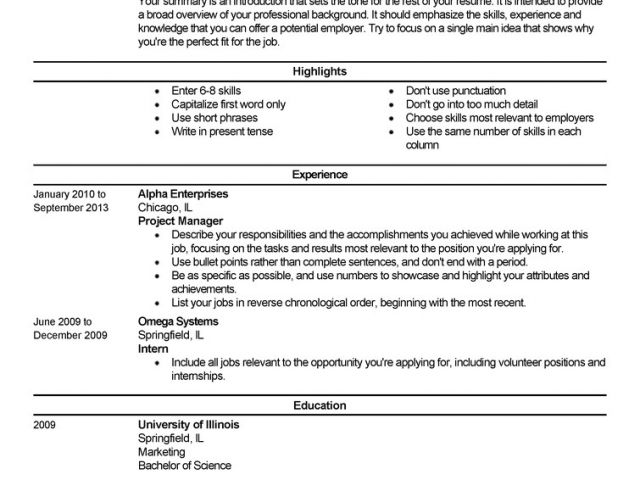
Chronological: This template lists your work experience in reverse chronological order, with the most recent experience first. This is a good choice if you have some work experience, but may not be the best option for beginners.
Functional: This template emphasizes your skills and qualifications rather than your work history. This is a good choice for beginners, as it allows you to highlight your strengths and education.
Combination: This template combines elements of both chronological and functional templates. This is a good choice if you have some work experience, but also want to highlight your skills and education.
What Makes a Great Template?
So, what makes a great resume template? Here are a few key things to look for:
Clear and concise formatting: A great template should be easy to read and scan, with clear headings and bullet points.
Relevant sections: Make sure the template includes relevant sections, such as a summary or objective statement, education, skills, and work experience.
Customizable: A great template should be easy to customize to fit your needs and experience.
Customizing Your Template
Once you've chosen a template, it's time to customize it. Here are a few tips:
Tailor your objective statement: Your objective statement should be tailored to the specific job you're applying for. Use language from the job posting to describe your skills and qualifications.
Highlight your education: As a beginner, your education is one of your strongest assets. Make sure to highlight your degree, relevant coursework, and any academic achievements.
Emphasize transferable skills: Even if you don't have direct work experience, you may have skills that are transferable to the job you're applying for. For example, if you've worked on group projects or volunteered, you may have developed skills in teamwork, communication, or problem-solving.
Common Mistakes to Avoid
When creating your resume, there are a few common mistakes to avoid:
Typos and grammatical errors: A single typo or grammatical error can make a negative impression on a potential employer. Make sure to proofread your resume multiple times.
Lack of relevance: Make sure your resume is tailored to the specific job you're applying for. Use language from the job posting to describe your skills and qualifications.
Inconsistent formatting: Make sure your formatting is consistent throughout your resume. Use the same font, spacing, and bullet points throughout.
Comparison of Popular Resume Templates
Here's a comparison of three popular resume templates:
| Template | Best for | Features |
|---|---|---|
| <strong>Microsoft Word Template</strong> | Traditional industries | Clean and simple design, easy to customize |
| <strong>Canva Template</strong> | Creative industries | Modern and stylish design, drag-and-drop functionality |
| <strong>Google Docs Template</strong> | Collaborative work | Easy to share and edit, cloud-based |
Trust-Building: Expert Advice
According to career counselor and resume expert, Jane Smith, "A great resume template is just the starting point. The key is to customize it to showcase your skills and experience, and to tailor it to the specific job you're applying for."
Practical Section: Creating a Resume from Scratch
Here's a step-by-step guide to creating a resume from scratch:
- Choose a template: Select a template that fits your needs and experience.
- Write your objective statement: Tailor your objective statement to the specific job you're applying for.
- List your education: Highlight your degree, relevant coursework, and any academic achievements.
- Emphasize transferable skills: Highlight skills that are transferable to the job you're applying for.
- Proofread and edit: Proofread your resume multiple times to catch any typos or grammatical errors.
FAQs
Here are a few frequently asked questions about resume templates for beginners:
Q: What is the best resume template for a beginner? The best resume template for a beginner is one that highlights education, skills, and any relevant coursework or projects.
Q: How do I customize a resume template?
Customize a resume template by tailoring your objective statement, highlighting your education, and emphasizing transferable skills.
- Q: What are some common mistakes to avoid when creating a resume?
Common mistakes to avoid when creating a resume include typos and grammatical errors, lack of relevance, and inconsistent formatting.
Closing
Creating a strong resume as a beginner can be a challenge, but with the right template and a little practice, you can showcase your skills and experience to potential employers. Remember to choose a template that fits your needs and experience, customize it to showcase your strengths, and proofread and edit multiple times. Good luck in your job search!
Related: free resume template for beginners
Related: How to Explain Absence Without Over - Sharing
Related: A Practical Guide to Finding the Best Side Hustle Ideas
Related: A Practical Guide to Best Small Business Ideas for Beginners
