
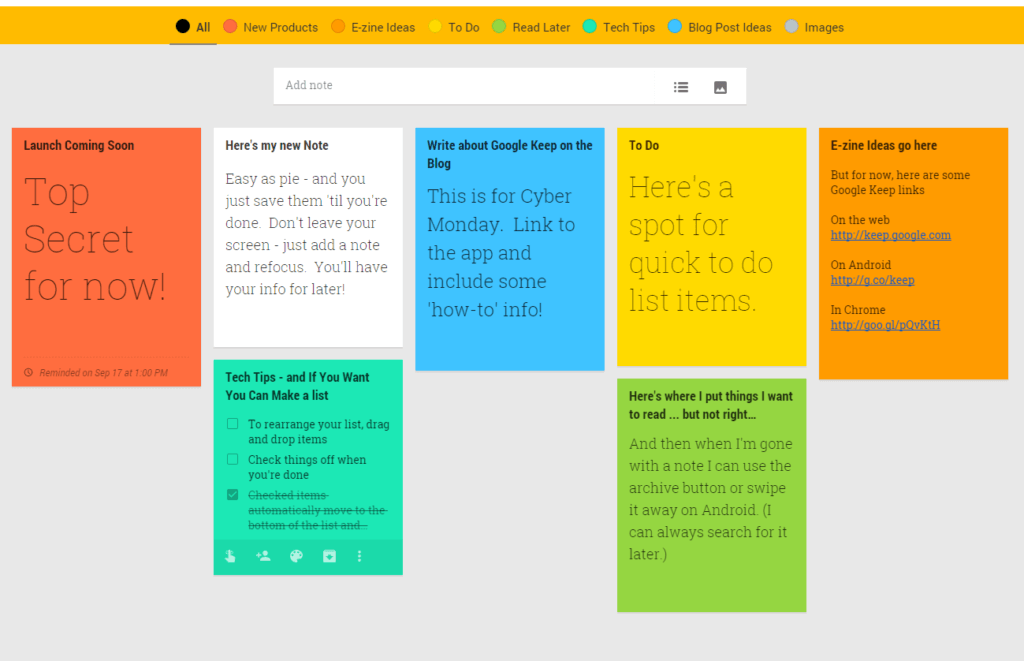
As a teacher, you wear many hats: educator, mentor, and organizer. Managing your classroom, lesson plans, and student progress can be overwhelming. That's where an online checklist app comes in – a simple yet powerful tool to streamline your tasks, reduce stress, and boost productivity.
What to Look for in an Online Checklist App for Teachers
When searching for the perfect online checklist app, consider the following essential features:
Ease of use: A user-friendly interface is crucial for busy teachers. Look for an app with an intuitive design that requires minimal training.
Customization: A good app should allow you to create tailored checklists, templates, and workflows that fit your teaching style.
Collaboration: The ability to share checklists and tasks with colleagues, students, or parents can enhance teamwork and communication.
Integration: Seamless integration with existing tools, such as Google Classroom or learning management systems, can simplify your workflow.
Accessibility: Ensure the app is accessible on various devices, including desktops, laptops, tablets, and smartphones.
Top Online Checklist Apps for Teachers
Here are some top online checklist apps that can help you streamline your teaching tasks:
Trello: A popular project management tool that uses boards, lists, and cards to organize tasks. Trello offers a free version, and its flexibility makes it suitable for various teaching applications.
Asana: A robust task management app that allows you to create and assign tasks, set deadlines, and track progress. Asana integrates with many educational tools and offers a free version.
Checklist.com: A simple, web-based checklist app designed specifically for teachers. It offers customizable templates, collaboration features, and integration with Google Classroom.
Google Keep: A minimalistic note-taking app that allows you to create and share checklists, reminders, and notes. Google Keep integrates seamlessly with Google Drive and Classroom.
Putting an Online Checklist App to Work
Let's consider a real-world scenario: You're a high school English teacher responsible for grading papers, preparing lesson plans, and managing student projects. You can use an online checklist app to:
Create a checklist for grading papers, including criteria such as content, grammar, and punctuation
Develop a lesson plan template that outlines objectives, materials, and activities
Assign tasks to students, such as reading assignments or project deadlines
Track student progress and provide feedback using a shared checklist or spreadsheet
Comparison of Top Online Checklist Apps
| <strong>App</strong> | <strong>Ease of Use</strong> | <strong>Customization</strong> | <strong>Collaboration</strong> | <strong>Integration</strong> | <strong>Free Version</strong> |
|---|---|---|---|---|---|
| Trello | 9/10 | 9/10 | 8/10 | 8/10 | Yes |
| Asana | 8.5/10 | 9/10 | 9/10 | 9/10 | Yes |
| Checklist.com | 9.5/10 | 8/10 | 8/10 | 7/10 | Yes |
| Google Keep | 9.5/10 | 6/10 | 7/10 | 9/10 | Yes |
Tips for Implementing an Online Checklist App
To get the most out of an online checklist app, follow these best practices:
Start small: Begin with a simple checklist or template and gradually add more features and complexity.
Customize templates: Create tailored templates that fit your teaching style and needs.
Train your students: Introduce the app to your students and provide guidance on how to use it effectively.
Monitor progress: Regularly review student progress and provide feedback to ensure they're on track.
Common Mistakes to Avoid
When implementing an online checklist app, avoid the following common mistakes:
Overcomplicating the app: Don't try to use too many features at once. Start with the basics and gradually add more complexity.
Not providing training: Ensure that you and your students understand how to use the app effectively.
Not integrating with existing tools: Make sure the app integrates with your existing tools and workflows to avoid duplication of effort.
Frequently Asked Questions
Q: What are the benefits of using an online checklist app for teachers?
An online checklist app can simplify teaching tasks, boost organization, and save time. It can also enhance collaboration and communication with students, colleagues, and parents.
Q: How do I choose the best online checklist app for my teaching needs?
Consider factors such as ease of use, customization, collaboration, integration, and accessibility when selecting an online checklist app.
Q: Can I use an online checklist app to track student progress?
Yes, many online checklist apps allow you to track student progress, assign tasks, and provide feedback.
Q: Are online checklist apps secure and reliable?
Most online checklist apps prioritize security and reliability. However, it's essential to review the app's security features and terms of service before use.
Conclusion
An online checklist app can be a valuable tool for teachers, helping to streamline tasks, reduce stress, and boost productivity. By considering the essential features, top apps, and best practices outlined in this article, you can find the perfect app to support your teaching needs. Take the first step towards a more organized and efficient classroom – explore online checklist apps today!
Related: Dog Care Instructions: What Actually Makes Sense?
Related: Free Printable Checklist for Traveling: Your Ultimate Packing
