
Packing for a Trip: The Never-Ending Struggle
Packing for a trip can be a daunting task. You've got a flight to catch, a hotel to check into, and a vacation to enjoy, but before all that, you need to figure out what to pack. The stress of forgetting something essential can weigh heavily on your mind. What if you could simplify this process with a practical tool?Enter: The Travel Packing Checklist Excel Template
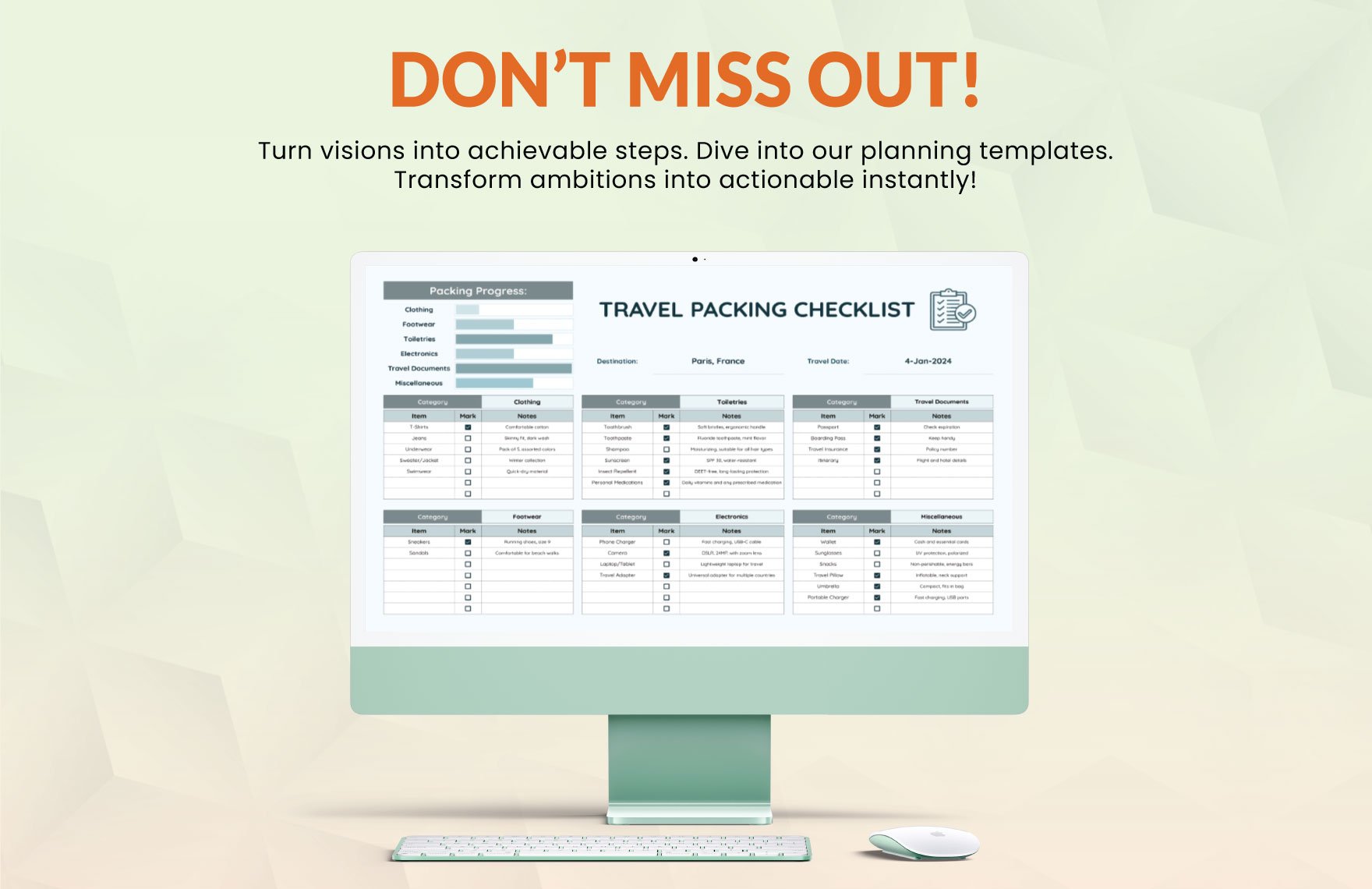
A travel packing checklist Excel template is a straightforward solution to your packing problems. By creating a personalized checklist, you can ensure that you never forget the essentials again. But what makes a good template, and how can you use it effectively?Key Components of an Effective Travel Packing Checklist
When creating or choosing a travel packing checklist Excel template, there are several key components to consider: Clothing: List the types of clothing you need for your trip, including undergarments, socks, pants, shirts, dresses, and outerwear.
Toiletries: Toothbrush, toothpaste, shampoo, conditioner, and any medications you may need.
Electronics: Phone, laptop, chargers, and any other devices you plan to bring.
Travel documents: Passport, visa, travel insurance, and driver's license.
Benefits of Using a Travel Packing Checklist Excel Template
Using a travel packing checklist Excel template has several benefits: Reduces stress: By having a clear list of what to pack, you can reduce the stress of packing and ensure that you don't forget anything important.
Saves time: A checklist helps you pack more efficiently, saving you time and effort.
Customizable: You can tailor your checklist to your specific needs and travel plans.
Creating Your Own Travel Packing Checklist Excel Template
Creating your own template is easy. Here's a step-by-step guide:- Open Excel: Start by opening Excel and creating a new spreadsheet.
- Identify your needs: Think about the types of items you need to pack for your trip.
- Create columns: Create columns for the type of item, quantity, and any additional notes.
- Fill in your list: Start filling in your list with the items you need to pack.
Example of a Travel Packing Checklist Excel Template
| Category | Item | Quantity | Notes |
|---|---|---|---|
| Clothing | Shirts | 3 | Include 1-2 dress shirts |
| Clothing | Pants | 2 | Include 1 pair of comfortable walking pants |
| Toiletries | Toothbrush | 1 | Electric toothbrush |
| Electronics | Phone | 1 | Include charger and portable charger |
Tips for Using Your Travel Packing Checklist Excel Template
Here are some tips for using your template effectively: Review and update regularly: Review your checklist before each trip and update it as needed.
Pack essentials in a separate bag: Pack essentials like your passport, phone charger, and medication in a separate bag in case your luggage gets lost.
Leave a copy with a friend or family member: Leave a copy of your checklist with a friend or family member in case of an emergency.
Common Mistakes to Avoid When Packing
Here are some common mistakes to avoid when packing: Overpacking: Avoid overpacking by planning outfits and packing only what you need.
Not checking the weather: Check the weather forecast before your trip and pack accordingly.
- Not leaving space for souvenirs: Leave some extra space in your luggage for souvenirs and other items you might purchase during your trip.
Travel Packing Checklist: A Comparison of Digital and Physical Options
When it comes to packing checklists, you have two main options: digital and physical. Here's a comparison of the two:| Digital (Excel Template) | Physical (Notebook or Paper) |
|---|---|
| <strong>Accessibility</strong> | Easily accessible on your phone or computer |
| <strong>Customization</strong> | Easily customizable |
| <strong>Space</strong> | Can store a lot of information in a small space |
"A travel packing checklist is only as good as the effort you put into it. Take the time to create a thorough list, and you'll be rewarded with a stress-free packing process and a more enjoyable trip."
Frequently Asked Questions
Q: What is the best way to create a travel packing checklist?
The best way to create a travel packing checklist is to use an Excel template or a digital tool that allows you to customize and easily update your list.
Q: How do I prioritize items on my packing list?
Prioritize essentials like your passport, phone charger, and medication, and then pack according to your travel plans and activities.
Q: Can I use a travel packing checklist for multiple trips?
Yes, you can use a travel packing checklist for multiple trips by updating it as needed and adjusting it to fit your specific travel plans.
Q: What are some common items to forget when packing?
Common items to forget when packing include chargers, adapters, and medications.
Conclusion
A travel packing checklist Excel template is a simple yet effective tool for simplifying your packing process. By creating a personalized checklist and following the tips outlined above, you can ensure a stress-free packing process and a more enjoyable trip. Take the time to create a thorough list, and you'll be rewarded with a more organized and enjoyable travel experience.Related: Budget Planner Template Free Printable: What Actually Makes
Related: Budget Planner Template Free PDF: What Actually Makes Sense?
Related: What to Know About Choosing the Best Online Course Platform
Related: What to Know About Free Resume Templates for Nurses
Related: International Travel Checklist for Families: Stay Organized
Related: Side Hustle Ideas for Teens
