
The quest for high-quality design tools without the hefty price tag is a common challenge many creatives face. With the rise of digital content, the demand for visually appealing materials has never been higher. Fortunately, there's a growing array of free design tools available online that can help you create stunning graphics, illustrations, and more without denting your wallet.
Finding the Right Tool for the Job
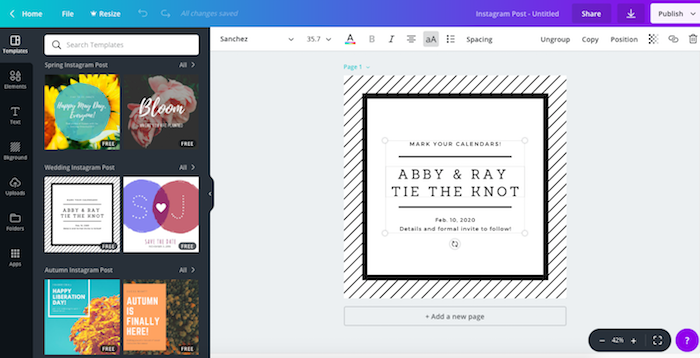
The first step in harnessing the power of free design tools is understanding what you need them for. Are you looking to create social media graphics, edit photos, design websites, or craft illustrations? Different tasks require different tools, and what works for one project might not work for another. For instance, if you're aiming to create intricate illustrations, a vector graphics editor like Inkscape might be your best bet. On the other hand, for quick social media posts, a tool like Canva could be more appropriate.
Exploring Popular Free Design Tools
- Canva: A user-friendly platform that offers a wide range of templates and design tools for non-designers and professionals alike. It's perfect for creating social media graphics, presentations, posters, and more.
- GIMP: Often considered the free alternative to Adobe Photoshop, GIMP (GNU Image Manipulation Program) offers a lot of the same functionality, including layers, filters, and effects, making it ideal for photo editing.
- Inkscape: A powerful vector graphics editor that's similar to Adobe Illustrator. It's great for creating logos, icons, and any type of graphic that requires scalability.
- Adobe Spark: A free online design app that allows you to create professional-looking web pages, videos, and graphics in minutes. It's particularly useful for those already familiar with Adobe's ecosystem.
The Tradeoff: Free vs. Paid
While free design tools can be incredibly powerful, there are tradeoffs to consider. Paid tools often offer more advanced features, better customer support, and more seamless integration with other software. For example, Adobe Photoshop offers a level of detail and nuance in photo editing that GIMP can't quite match. However, for many users, especially those just starting out or working on smaller projects, the free alternatives provide more than enough functionality.
Practical Considerations
When choosing a free design tool, consider the learning curve. Some tools, like GIMP and Inkscape, offer a lot of power but can be overwhelming for beginners. On the other hand, tools like Canva and Adobe Spark are designed to be intuitive, making it easier to get started right away. Additionally, think about the community and resources available. A tool with an active user base and plenty of tutorials can be a huge advantage, especially if you're new to design.
A Quick Comparison
| Tool | Ideal for | Learning Curve | Community/Resources |
|---|---|---|---|
| Canva | Social media graphics, presentations | Easy | Large, extensive resources |
| GIMP | Photo editing | Steep | Moderate, good tutorials |
| Inkscape | Vector graphics, illustrations | Steep | Moderate, active community |
| Adobe Spark | Web pages, videos, graphics | Easy | Large, integrates with Adobe |
Trust and Security
As with any free software, it's crucial to consider the trustworthiness of the tool. Ensure that the software is from a reputable source and has a transparent privacy policy. For instance, tools like Canva and Adobe Spark, from well-established companies, have robust security measures in place to protect your work and data.
Frequently Asked Questions
Q: Are free design tools really free?
Yes, but some may offer in-app purchases or premium features for a fee. Always check the terms of service.
Q: Can I use free design tools for commercial projects?
It depends on the tool's license. Some free tools allow commercial use, while others may not.
Q: Are free design tools as good as paid ones?
For many users and projects, yes. However, paid tools often offer more advanced features and support.
Q: Do I need to be a professional designer to use free design tools?
No, many free design tools are designed with the non-designer in mind, offering user-friendly interfaces and templates.
Making the Most of Free Design Tools
To get the most out of free design tools, start by experimenting with different options to find what works best for you. Take advantage of tutorials and community resources to improve your skills. And don't be afraid to combine tools—using Canva for social media graphics and GIMP for photo editing, for example—to create a workflow that suits your needs.
By understanding your needs, exploring the range of free tools available, and being mindful of the tradeoffs and practical considerations, you can elevate your design capabilities without spending a fortune. Whether you're a seasoned designer or a beginner looking to create engaging visual content, there's a free design tool out there that can help you achieve your goals.
