
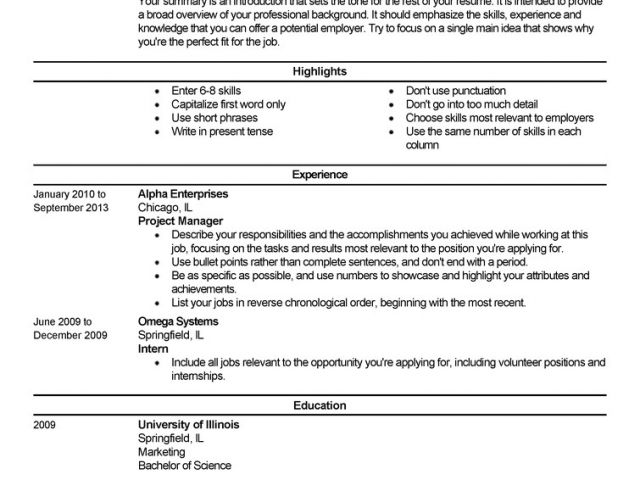
As a recent graduate or someone entering the workforce for the first time, creating a strong resume can be daunting. With so many templates and designs to choose from, it's hard to know where to start. In this article, we'll explore five useful things to know about resume templates for beginners, helping you to create a compelling and effective resume that lands you an interview.
Choosing the Right Resume Template
When it comes to selecting a resume template, there are many options available. You can find templates online, on job boards, or through word processing software like Microsoft Word or Google Docs. But with so many choices, how do you pick the right one?The key is to consider your industry, experience, and the type of job you're applying for. For example, if you're applying for a creative field, a template with a bold and colorful design might be suitable. However, if you're applying for a more traditional industry, a simple and clean template is often best.
What to Look for in a Resume Template
When evaluating a resume template, consider the following factors: Layout and formatting: Is the template easy to read and scan? Are the sections clearly defined?
Customization: Can you easily add or remove sections to fit your needs?
Visual appeal: Does the template look professional and visually appealing?
Understanding Resume Structure
A well-structured resume is essential for making a strong impression on hiring managers. Here are the basic sections you should include: Contact information: Your name, email address, phone number, and LinkedIn profile (if applicable)
Professional summary: A brief overview of your experience, skills, and education
Education: Your degree, institution, and relevant coursework
Work experience: A reverse chronological list of your work experience, including job titles, company names, and achievements
Skills: A list of relevant skills, including technical and soft skills
Customizing Your Resume Template
Once you've chosen a template, it's essential to customize it to fit your needs. Here are some tips: Tailor your professional summary: Write a unique summary for each job you apply to, highlighting your relevant experience and skills.
Emphasize achievements: Instead of just listing job responsibilities, focus on the achievements and results you've achieved in your previous roles.
Use keywords: Use keywords from the job description to help your resume pass through applicant tracking systems (ATS) and catch the eye of hiring managers.
Common Mistakes to Avoid
When creating a resume, there are several common mistakes to avoid: Typos and grammatical errors: A single mistake can make a negative impression and hurt your chances of getting hired.
Lack of relevance: Make sure your resume is tailored to the job you're applying for, and that your skills and experience align with the job requirements.
Inconsistent formatting: Use a consistent font, spacing, and formatting throughout your resume to make it easy to read.
Additional Tips and Resources
Here are some additional tips and resources to help you create a strong resume: Use action verbs: Use action verbs like "managed," "created," and "developed" to describe your achievements.
Quantify your achievements: Use numbers and statistics to demonstrate the impact of your work.
Get feedback: Ask a friend or mentor to review your resume and provide feedback.
Comparison of Popular Resume Templates
Here's a comparison of some popular resume templates:| Template | Description | Best for |
|---|---|---|
| <strong>Chronological</strong> | Emphasizes work experience in reverse chronological order | Traditional industries, experienced professionals |
| <strong>Functional</strong> | Emphasizes skills and qualifications rather than work experience | Career changers, those with gaps in employment |
| <strong>Combination</strong> | Combines elements of chronological and functional templates | Most industries, versatile |
Frequently Asked Questions
Here are some frequently asked questions about resume templates for beginners: Q: What is the best resume template for a beginner?
The best resume template for a beginner is one that is clean, simple, and easy to read. A chronological template is often a good choice, as it emphasizes work experience and education.
Q: How do I choose a resume template?
Choose a resume template that fits your industry, experience, and the type of job you're applying for. Consider the layout, formatting, and visual appeal of the template.
Q: What should I include in my resume?
Your resume should include your contact information, professional summary, education, work experience, and skills.
Q: How do I customize my resume template?
Customize your resume template by tailoring your professional summary, emphasizing achievements, and using keywords from the job description.
Final Tips and Next Steps
Creating a strong resume takes time and effort, but it's worth it to land your first job. Remember to: Keep it concise: Keep your resume to one or two pages, depending on your experience.Use a standard font: Use a standard font like Arial, Calibri or Helvetica.
Proofread: Carefully proofread your resume to catch any typos or grammatical errors.
By following these tips and choosing the right resume template, you'll be well on your way to creating a compelling and effective resume that helps you stand out in a competitive job market.
Related: What to Know About Online Business Ideas for Beginners
