
What to Know About Free Design Tools Online
The quest for high-quality design tools without a hefty price tag is a common challenge for many creatives, marketers, and small business owners. With the rise of online design platforms, you can now access a wide range of free design tools that can help you create stunning visual content. But which ones are worth your time, and what are the tradeoffs?
Finding the Right Free Design Tool
When searching for free design tools online, it's essential to consider your specific needs and goals. Are you looking for a simple graphic design tool or a more advanced digital art software? Do you need a tool for creating social media graphics, infographics, or presentations?
Some popular free design tools online include Canva, GIMP, and Adobe Spark. Each tool has its strengths and weaknesses, and choosing the right one depends on your level of design expertise and the type of projects you'll be working on.
Canva: The Popular Choice
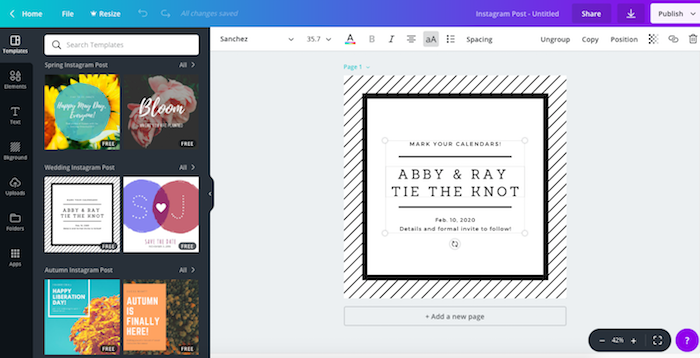
Canva is one of the most widely used free design tools online, with over 50 million users worldwide. Its user-friendly interface and vast template library make it an excellent choice for creating social media graphics, presentations, and infographics.
Pros: Easy to use, vast template library, and seamless integrations with popular platforms like Google Drive and Dropbox.
Cons: Limited advanced features, watermarks on free images, and limited export options.
GIMP: The Advanced Alternative
GIMP (GNU Image Manipulation Program) is a free and open-source digital art software that offers advanced features like layer editing, filters, and effects. It's a great choice for those who want more control over their design process.
Pros: Advanced features, customizable interface, and no watermarks on images.
Cons: Steep learning curve, limited user support, and compatibility issues with certain file formats.
Comparing Free Design Tools
| Tool | Ease of Use | Features | Export Options | Limitations |
|---|---|---|---|---|
| Canva | Easy | Templates, graphics, and fonts | PNG, JPEG, PDF | Watermarks on free images, limited export options |
| GIMP | Advanced | Layer editing, filters, and effects | PNG, JPEG, PSD | Steep learning curve, compatibility issues |
| Adobe Spark | Easy | Templates, graphics, and fonts | PNG, JPEG, PDF | Limited advanced features, requires Adobe account |
Practical Tips for Using Free Design Tools
When using free design tools online, keep the following tips in mind:
Start with a clear goal: Define your design objective and choose a tool that aligns with your needs.
Experiment with templates: Templates can save you time and inspire your design.
Keep it simple: Don't overcomplicate your design with too many elements or fonts.
Use high-quality images: Invest in high-quality images or use free image resources like Unsplash or Pexels.
Trust-Building: What to Watch Out For
While free design tools online can be incredibly helpful, there are some potential drawbacks to be aware of:
Limited features: Free tools often have limited features compared to paid versions.
Watermarks and branding: Some free tools may add watermarks or branding to your designs.
- Security concerns: Be cautious when uploading sensitive information or using tools with unclear security policies.
Case Study: Creating a Social Media Graphic with Canva
Let's say you want to create a social media graphic announcing a new product launch. With Canva, you can:
- Choose a template or start from scratch
- Customize the design with your brand colors and fonts
- Add graphics, images, and text
- Export the design as a PNG or JPEG
FAQs
Q: What is the best free design tool for beginners?
Canva is an excellent choice for beginners, with its user-friendly interface and vast template library.
Q: Can I use free design tools for commercial projects?
It depends on the tool's terms of service. Some free tools may have restrictions on commercial use, while others may allow it.
Q: Are free design tools as good as paid ones?
While free design tools can be incredibly useful, they often have limitations compared to paid versions. However, some free tools can still produce high-quality designs.
Closing
Free design tools online have come a long way, offering a wide range of features and capabilities. By understanding your needs, choosing the right tool, and being aware of potential limitations, you can create stunning visual content without breaking the bank. Whether you're a seasoned designer or a beginner, there's a free design tool out there that can help you achieve your creative goals.
Related: A Practical Guide to Free Online Landscape Design Tools
Related: Streamline Your Learning: Free Course Template Download
