

Introduction to Online Course Templates
When creating an online course, whether for educational purposes or professional development, having a structured template can significantly streamline the process. Online course templates offer a pre-designed framework that can be customized to fit the specific needs of your course content. This not only saves time but also ensures consistency and quality across your educational materials. In this article, we'll explore the benefits of using online course templates, where to find free templates, and how to select the right one for your needs.
Benefits of Using Online Course Templates
Using online course templates comes with several advantages.
Time Efficiency: Templates save you from starting from scratch, allowing you to focus on content creation rather than layout and design.
Consistency: They provide a uniform structure, making it easier for students to follow and understand the course material.
Customization: Most templates are customizable, enabling you to tailor the course to your specific teaching style and branding.
Professional Look: Templates are often designed by professionals, ensuring your course looks polished and engaging.
Finding Free Online Course Templates
There are numerous resources where you can find free online course templates. Here are some popular options:
Template.net: Offers a wide range of free course templates for various subjects and formats, including PowerPoint, Google Slides, and PDF.
SlideModel: Provides free and premium templates for educational purposes, with a focus on PowerPoint and Google Slides.
Canva: A versatile design platform that offers free course templates, along with a user-friendly editor for customization.
Choosing the Right Template for Your Course
Selecting the appropriate template depends on several factors, including the subject matter, target audience, and your personal teaching style. Consider the following:
Subject Matter: Different subjects may require different layouts. For example, a coding course might benefit from a template with code snippets, while a history course might use a template with more images and historical timelines.
Target Audience: Templates for professional courses might look more formal and corporate, while those for younger audiences can be more colorful and engaging.
Customization Needs: Choose a template that is easy to customize to fit your brand and teaching style.
Customizing Your Online Course Template
Once you've selected a template, customization is key to making it your own. Here are some tips:
Modify the Color Scheme: Adjust the colors to match your brand or to evoke the right mood for your course.
Add Your Logo: Incorporate your logo to give the course a professional and personalized touch.
Reorganize Content Sections: Tailor the template's sections to best present your course material.
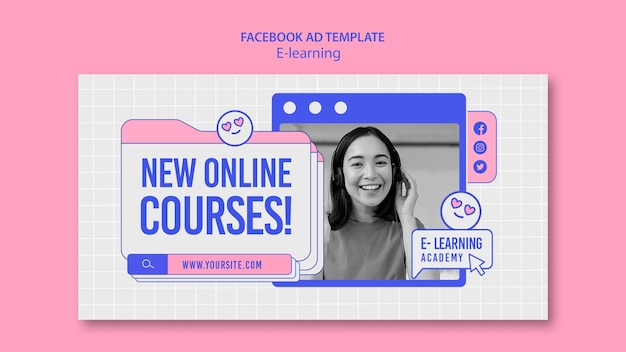
Practical Tips for Using Online Course Templates
Maximizing Engagement
To maximize student engagement, consider the following strategies:
Interactive Elements: Incorporate interactive elements such as quizzes, polls, and discussion forums.
Multimedia Content: Use videos, animations, and infographics to present information in varied and engaging ways.
Ensuring Accessibility
Make sure your course is accessible to all students:
Alt Text for Images: Add alternative text to images for screen readers.
- Clear Navigation: Ensure that the course navigation is intuitive and easy to follow.

Comparing Popular Template Sources
| Template Source | Features | Customization Options | Cost |
|---|---|---|---|
| Template.net | Wide range of templates, various formats | High | Free |
| SlideModel | High-quality templates, focus on PowerPoint/Google Slides | Medium to High | Free/Premium |
| Canva | Versatile design platform, user-friendly editor | High | Free/Premium |
FAQs
Q: Where can I find free online course templates?
You can find free online course templates on websites like Template.net, SlideModel, and Canva.
Q: How do I choose the right template for my course?
Consider the subject matter, target audience, and your customization needs when selecting a template.
Q: Can I customize free online course templates?
Yes, most free templates are customizable to some extent, allowing you to adjust colors, add logos, and reorganize sections.
Q: Are there any limitations to using free templates?
Free templates might have limitations in terms of customization options, features, or support compared to premium templates.
Conclusion
Free online course templates are a valuable resource for educators and course creators looking to streamline their content creation process. By understanding the benefits, knowing where to find these templates, and how to customize them effectively, you can create high-quality, engaging courses with minimal effort. Whether you're teaching a professional development course or creating educational content for students, leveraging free online course templates can help you achieve your goals efficiently and effectively. With the right template, you can focus on what matters most—delivering valuable knowledge and skills to your audience.
Related: What to Know About Choosing an Online Course Website Template
Related: Free Courses Website Templates to Boost Your Online Learning
Related: Find the Perfect Free Resume Template for Microsoft Word
Related: How to Master Email Marketing as a Beginner Without
