
Taking Control of Your International Travels
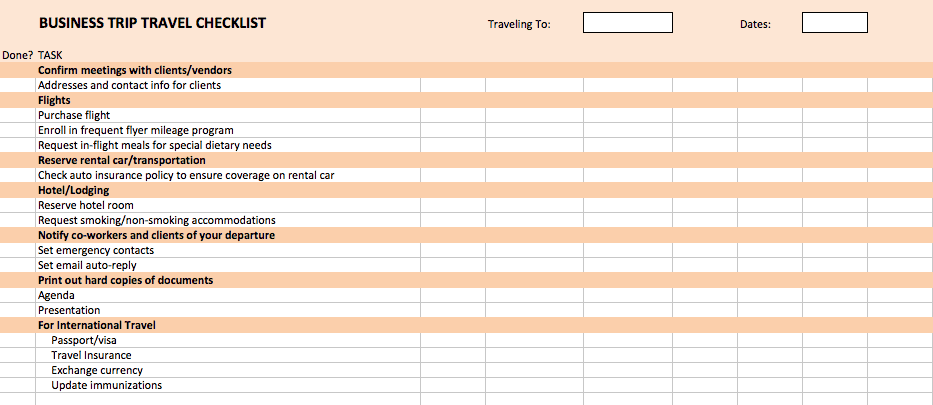
As an experienced traveler, you know that planning an international trip can be overwhelming. From visa requirements to vaccination records, and from flight itineraries to accommodation bookings, there's a lot to keep track of. A well-organized international travel checklist can be a lifesaver, helping you stay on top of everything and ensuring a smooth journey. In this article, we'll show you how to create a personalized international travel checklist in Excel, tailored to your specific needs.
Setting Up Your Excel Checklist
To create an effective international travel checklist in Excel, you'll need to set up a few key columns and sections. Here's a suggested layout:
Task: Describe the task or item to be completed (e.g., "Book flights," "Apply for visa," "Pack essential documents")
Status: Track the status of each task (e.g., "Not started," "In progress," "Completed")
Due Date: Set a deadline for completing each task
Notes: Add any additional information or comments related to the task
Create a new Excel spreadsheet and set up these columns. You can also add more columns or sections as needed, such as a "Category" column to group tasks by type (e.g., "Travel documents," "Packing," "Finances").
Essential Sections for Your International Travel Checklist
Your international travel checklist should cover several essential areas. Here are some suggested sections to include:
Travel Documents
Passport validity and expiration date
Visa requirements and application status
Travel insurance documents
Flight itinerary and hotel booking confirmation
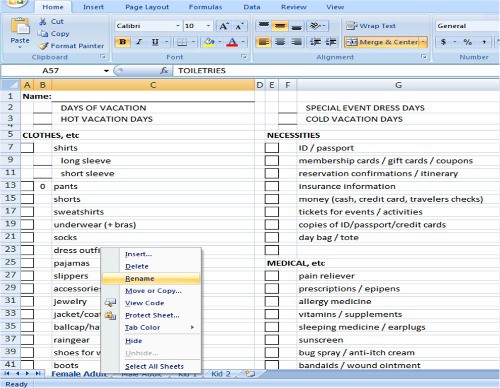
Packing
Essential clothing and gear
Toiletries and medications
Electronics and chargers
Travel adapters and converters
Finances
Budget and expenses
Currency exchange and credit card information
Traveler's checks or emergency funds
Health and Safety
Vaccination records and medication schedules
Travel health insurance
Safety precautions and emergency contact information
Customizing Your Checklist
Your international travel checklist should reflect your specific travel plans and needs. Here are a few examples of how to customize your checklist:
Destination-specific tasks: Add tasks specific to your destination, such as obtaining a visa or registering with your government's travel advisory program.
Travel style: If you're a backpacker, you may need to include tasks related to hostel bookings and gear rentals. If you're traveling with family, you may need to include tasks related to childcare and school enrollments.
Personal preferences: If you have specific dietary needs or preferences, you may want to include tasks related to food and meal planning.
Tips for Using Your International Travel Checklist
Here are a few tips for getting the most out of your international travel checklist:
Review and update regularly: Regularly review your checklist to ensure everything is complete and up-to-date.
Prioritize tasks: Prioritize tasks based on their importance and deadlines.
Use conditional formatting: Use conditional formatting in Excel to highlight tasks that are overdue or incomplete.
Common Mistakes to Avoid
Here are a few common mistakes to avoid when creating and using an international travel checklist:
Not tailoring the checklist to your needs: Make sure your checklist reflects your specific travel plans and needs.
Not reviewing and updating regularly: Regularly review your checklist to ensure everything is complete and up-to-date.
- Not prioritizing tasks: Prioritize tasks based on their importance and deadlines.
Comparison of Digital and Physical Checklists
| Digital Checklist (Excel) | Physical Checklist (Paper) |
|---|---|
| <strong>Accessibility</strong> | Easily accessible on multiple devices |
| <strong>Customization</strong> | Easily customizable |
| <strong>Collaboration</strong> | Easily shareable with others |
While both digital and physical checklists have their advantages and disadvantages, a digital checklist in Excel offers greater flexibility, accessibility, and collaboration.
FAQ
Q: What is the best way to create an international travel checklist in Excel?
Start by setting up a few key columns and sections, such as task, status, due date, and notes. Customize your checklist to reflect your specific travel plans and needs.
Q: How do I prioritize tasks on my international travel checklist?
Prioritize tasks based on their importance and deadlines. Use conditional formatting in Excel to highlight tasks that are overdue or incomplete.
Q: Can I use a digital checklist for international travel planning?
Yes, a digital checklist in Excel offers greater flexibility, accessibility, and collaboration. You can easily access and update your checklist on multiple devices.
Q: What are some common mistakes to avoid when creating an international travel checklist?
Avoid not tailoring the checklist to your needs, not reviewing and updating regularly, and not prioritizing tasks.
Final Check
With a well-organized international travel checklist in Excel, you'll be able to manage your travel plans with ease and confidence. Remember to customize your checklist to reflect your specific needs, prioritize tasks, and review and update regularly. Happy travels!
Related: A Practical Guide to International Travel Checklist 2024
Related: Pack Smart: Your Ultimate Travel Packing Checklist PDF Free
Related: Free Online Garden Design Tools for a Stunning Yard
