
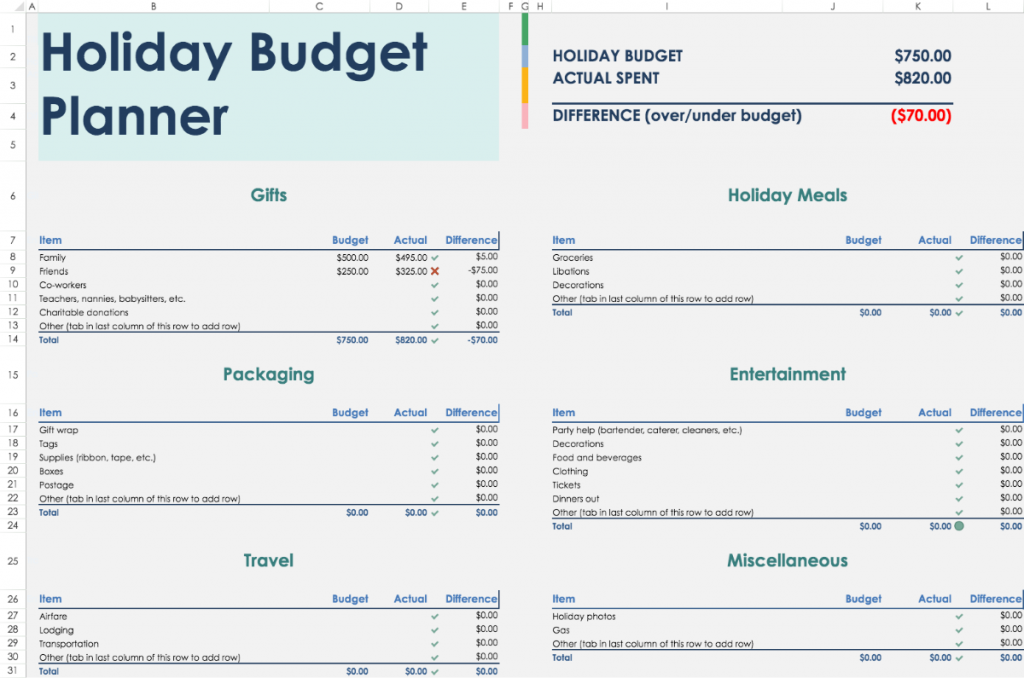
Taking Control of Your Finances with a Budget Planner Template
Managing your finances effectively is crucial for achieving stability and peace of mind. Yet, for many of us, creating a budget can seem daunting. Where do you start? How do you track your expenses and income? A budget planner template in Excel can be a straightforward solution to help you understand and manage your finances without confusion.
What is a Budget Planner Template?
A budget planner template is a pre-designed Excel spreadsheet that helps you organize your financial data. It typically includes sections for income, expenses, savings, and debt repayment. By using a template, you can quickly input your financial information and gain insights into your spending habits.
Benefits of Using a Budget Planner Template in Excel
Excel is an ideal platform for creating a budget planner template due to its flexibility and functionality. Here are some benefits of using a budget planner template in Excel:
Easy to use: Excel templates are user-friendly, making it easy to input your financial data and navigate the spreadsheet.
Customizable: You can tailor the template to fit your specific financial needs and goals.
Automated calculations: Excel performs calculations automatically, saving you time and reducing errors.
Visual insights: With charts and graphs, you can visualize your financial data and make informed decisions.
Choosing the Right Budget Planner Template
When selecting a budget planner template in Excel, consider the following factors:
Your financial goals: What do you want to achieve with your budget? (e.g., save for a down payment, pay off debt, build an emergency fund)
Your income and expenses: How complex is your financial situation? (e.g., multiple income sources, variable expenses)
Your level of comfort with Excel: Are you a beginner or advanced user?
Some popular types of budget planner templates include:
Simple budget template: A basic template for tracking income and expenses.
Zero-based budget template: A template that allocates every dollar towards a specific expense or savings goal.
50/30/20 budget template: A template that divides income into 50% for necessities, 30% for discretionary spending, and 20% for savings and debt repayment.
How to Use a Budget Planner Template in Excel
Here's a step-by-step guide to using a budget planner template in Excel:
Step 1: Download and Open the Template
Find a reputable source for budget planner templates, such as Microsoft's official template gallery or a well-known personal finance website. Download the template and open it in Excel.
Step 2: Input Your Financial Data
Enter your income, expenses, savings, and debt repayment information into the template. Be sure to include all sources of income and fixed expenses, such as rent/mortgage, utilities, and groceries.
Step 3: Customize the Template
Adjust the template to fit your specific financial needs and goals. You may need to add or remove sections, or modify formulas and calculations.

Step 4: Analyze and Adjust
Review your financial data and make adjustments as needed. Use charts and graphs to visualize your spending habits and identify areas for improvement.
Comparison of Popular Budget Planner Templates
| Template | Features | Ease of Use |
|---|---|---|
| Simple Budget Template | Basic income and expense tracking | Easy |
| Zero-Based Budget Template | Allocates every dollar towards a specific goal | Medium |
| 50/30/20 Budget Template | Divides income into 50% for necessities, 30% for discretionary spending, and 20% for savings and debt repayment | Easy |
"A budget planner template in Excel is not just a tool for tracking expenses; it's a powerful ally in achieving financial stability and peace of mind." - Financial Expert
Tips for Getting the Most Out of Your Budget Planner Template
Regularly review and update your budget: Life changes, such as a new job or move, can impact your finances. Make sure to adjust your budget accordingly.
Use budgeting categories: Organize your expenses into categories, such as housing, transportation, and entertainment, to better understand your spending habits.
- Prioritize needs over wants: Be honest about what you need versus what you want. Make sure to prioritize essential expenses over discretionary spending.
Common Questions About Budget Planner Templates in Excel
Q: What is the best budget planner template for beginners?
A simple budget template is a great starting point for beginners. It allows you to track income and expenses without feeling overwhelmed.
Q: Can I use a budget planner template for multiple people?
Yes, you can use a budget planner template for multiple people, such as a family or business. Just be sure to adjust the template to accommodate multiple income sources and expenses.
Q: How often should I review my budget?
It's a good idea to review your budget regularly, such as every few months or whenever you experience a significant change in income or expenses.
Q: Can I use a budget planner template for investing and retirement planning?
While a budget planner template can help you track your finances, it's not a substitute for investing and retirement planning. Consider consulting a financial advisor for personalized advice.
Conclusion
A budget planner template in Excel can be a valuable tool for achieving financial stability and peace of mind. By choosing the right template, customizing it to fit your needs, and regularly reviewing your budget, you can take control of your finances and make informed decisions. Don't let financial stress hold you back – start planning today!
Related: A Practical Guide to Finding the Best Free Budget Planner
