

Finding the Right Content Calendar Template in Word
When it comes to planning and organizing content, a well-crafted content calendar is indispensable. For many businesses and individuals, Microsoft Word remains a go-to application for creating and editing documents. But can Word effectively host your content calendar needs? In this article, we'll explore what to know about content calendar templates in Word, including their benefits, limitations, and how to select the most suitable one.
Benefits of Using Content Calendar Templates in Word
Content calendar templates in Word offer several advantages. Firstly, they are widely accessible; most people are familiar with Word, making it easy to share, edit, and collaborate on content calendars. Additionally, Word templates can be easily customized to fit specific needs, allowing for the inclusion of various details such as publication dates, content types, and responsible team members.
Another significant benefit is cost-effectiveness. Many content calendar templates for Word are available for free or at a low cost, providing a budget-friendly solution for businesses and individuals looking to streamline their content planning process.
Types of Content Calendar Templates Available in Word
There are numerous types of content calendar templates available for Word, catering to different needs and preferences. Some templates are designed specifically for editorial content, focusing on blog posts, articles, and other written materials. Others are more versatile, accommodating various content types such as social media posts, videos, and podcasts.
When selecting a template, consider the type of content you primarily produce and the level of detail you need to track. For instance, a simple blog-focused template might suffice for a small business, while a more comprehensive template could be necessary for a large media outlet.
How to Choose the Best Content Calendar Template in Word
Choosing the best content calendar template in Word involves evaluating several factors. Here are a few key considerations:
- Customization: The template should be easily customizable to fit your specific needs, including adding or removing sections as necessary.
- Ease of Use: Opt for a template that is straightforward to understand and use, minimizing the learning curve for you and your team.
- Collaboration Features: If multiple team members will be working on the calendar, consider a template that facilitates collaboration, perhaps through shared access in Word Online or compatibility with other Microsoft Office tools.
Comparison of Popular Content Calendar Templates in Word
Several popular content calendar templates are available for Word, each with its strengths and weaknesses.
| Template Name | Description | Customization | Collaboration |
|---|---|---|---|
| Basic Editorial Calendar | Simple and straightforward, ideal for small teams or blogs. | Easy | Limited |
| Comprehensive Content Calendar | Detailed template covering various content types and publication channels. | Advanced | High |
| Social Media Content Calendar | Focused on social media content, suitable for marketing teams. | Moderate | High |
Limitations and Potential Drawbacks
While content calendar templates in Word can be highly beneficial, there are some limitations to consider. For instance, Word might not offer the same level of dynamic functionality as specialized content management or project management tools. This could result in a less interactive experience, particularly for larger teams or more complex content strategies.
Moreover, maintaining a content calendar in Word requires manual updates, which can be time-consuming and prone to errors. If not regularly updated, the calendar can quickly become outdated and unreliable.
Best Practices for Using Content Calendar Templates in Word
To maximize the effectiveness of your content calendar template in Word, follow these best practices:
- Regular Updates: Make it a habit to regularly update the calendar to reflect changes, additions, or cancellations of content.
- Collaboration: Take advantage of Word's collaboration features to ensure team members can contribute and access the calendar easily.
- Backup: Regularly save and backup your content calendar to prevent data loss.
FAQs
Q: Can I use a content calendar template in Word for social media content planning?
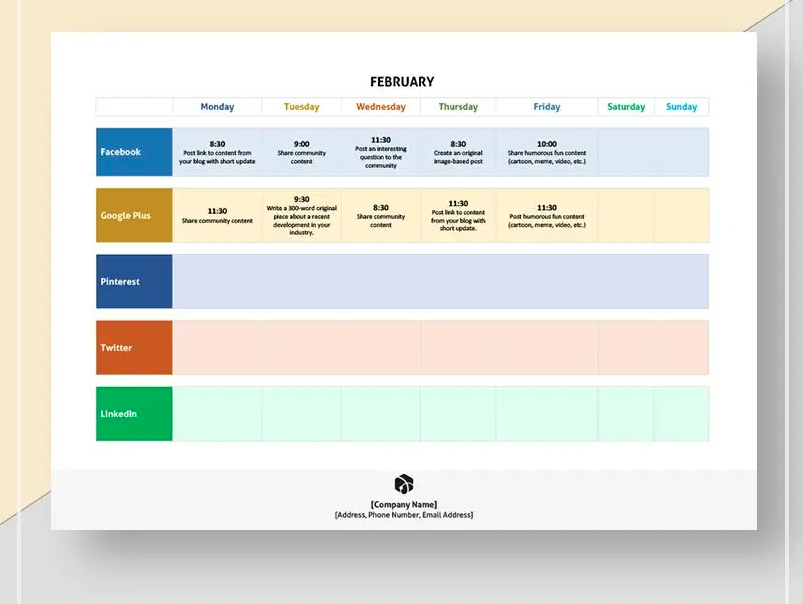
Yes, there are templates specifically designed for social media content planning that you can use in Word. These templates typically include columns for different social media platforms, posting dates, and content descriptions.
Q: How do I customize a content calendar template in Word?
Customizing a template involves modifying the existing layout and content to fit your needs. This can include adding or removing sections, changing column headers, and adjusting the formatting.
Q: Are there any free content calendar templates available for Word?
Yes, there are many free content calendar templates available for Word. You can find these through Microsoft's template gallery or other third-party websites offering free templates.
Q: Can I share my content calendar with team members if it's created in Word?
Yes, you can share your content calendar with team members by sending them the Word document via email or sharing it through a cloud storage service like OneDrive. Word Online also allows for real-time collaboration.
Conclusion
Content calendar templates in Word offer a practical and accessible solution for planning and organizing content. While they come with certain limitations, their benefits, including ease of use, customization options, and cost-effectiveness, make them a valuable tool for businesses and individuals alike. By understanding how to select, customize, and effectively use these templates, you can significantly enhance your content planning process.
Related: Content Calendar Template Excel Free: What Actually Makes
