

Unleashing Creativity with Free Design Tools
The world of digital design can be intimidating, especially for those on a tight budget. However, with the rise of free design tools online, creating stunning visuals, graphics, and artwork is no longer a luxury reserved for professionals or deep-pocketed businesses. Whether you're a student, entrepreneur, or hobbyist, there's a wealth of free design tools waiting to be explored. In this article, we'll guide you through the best free design tools online, their capabilities, and how to make the most of them.
Exploring the Landscape of Free Design Tools
Free design tools online come in various shapes and sizes, catering to different needs and skill levels. Some tools focus on graphic design, offering features like logo creation, infographics, and social media graphics. Others specialize in digital art, providing a platform for painting, drawing, and photo editing. With so many options available, it's essential to understand the types of tools on offer and their potential applications.
Types of Free Design Tools
- Graphic Design Tools: These tools are perfect for creating visual content for marketing, branding, and social media. They often include templates, drag-and-drop interfaces, and a vast library of fonts, icons, and images.
- Digital Art Tools: Aimed at artists and illustrators, these tools offer a range of brushes, effects, and customization options to create original artwork.
- Photo Editing Tools: For those looking to enhance or manipulate photos, these tools provide filters, adjustments, and effects.
Top Free Design Tools Online
When it comes to choosing the right free design tool, the options can be overwhelming. Here are some of the top tools in various categories, known for their ease of use, feature set, and overall value.
Graphic Design
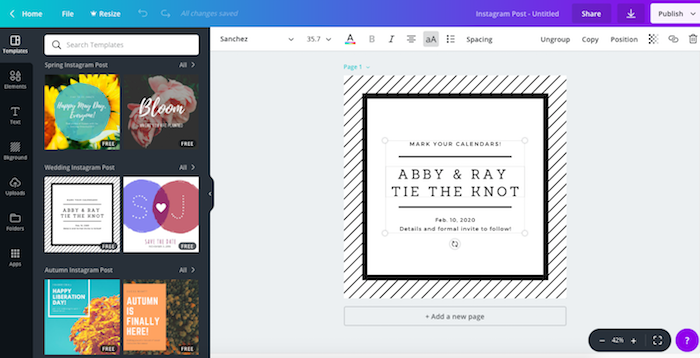
- Canva: A popular choice for non-designers and professionals alike, Canva offers a wide range of templates, design tools, and a user-friendly interface. It's perfect for creating social media graphics, presentations, and marketing materials.
- GIMP: For those looking for a more comprehensive graphic design experience, GIMP (GNU Image Manipulation Program) provides many of the features found in paid software like Adobe Photoshop.
Digital Art
- Krita: This free and open-source painting software offers a wide range of brush engines, including customizable brushes, textures, and effects. It's ideal for digital artists looking for a professional-grade tool.
- Inkscape: A vector graphics editor, Inkscape is comparable to Adobe Illustrator. It's great for creating logos, icons, and illustrations.
Photo Editing
- Pixlr: A free online photo editor, Pixlr offers a range of tools and filters to enhance and manipulate photos. It's user-friendly and doesn't require registration.
Practical Tips for Using Free Design Tools
To get the most out of free design tools, consider the following tips:
- Start Simple: Begin with basic tools and gradually move to more complex software as your skills improve.
- Experiment: Don't be afraid to try new features and techniques. Most free design tools offer a lot of room for experimentation.
- Community Resources: Look for communities, forums, and tutorials related to the tool you're using. They can provide valuable insights, templates, and support.
Comparison of Free Design Tools
| Tool | Category | Skill Level | Key Features |
|---|---|---|---|
| Canva | Graphic Design | Beginner | Templates, drag-and-drop, vast asset library |
| GIMP | Graphic Design | Intermediate | Advanced editing features, customizable brushes |
| Krita | Digital Art | Intermediate | Customizable brushes, textures, effects |
| Inkscape | Digital Art | Intermediate | Vector graphics, customizable tools |
| Pixlr | Photo Editing | Beginner | Filters, adjustments, effects |
"The best design tool is the one that helps you achieve your creative vision with the least amount of friction." - Anonymous Designer
Overcoming Limitations of Free Design Tools
While free design tools offer a lot of value, they may come with limitations, such as watermarks, limited export options, or restricted access to premium features. Here are some strategies to overcome these challenges:
- Understand the Limitations: Know what you're getting into. Read the terms of service and understand any limitations.
- Look for Workarounds: Sometimes, there are community-created solutions or unofficial workarounds to common limitations.
- Upgrade When Necessary: If you find yourself consistently hitting the limitations of a free tool, it might be time to consider a paid upgrade or alternative.
Frequently Asked Questions
Q: Are free design tools really free?
Most free design tools are indeed free to use, but some may offer premium features or assets at an additional cost. Always read the terms of service.
Q: Can I use free design tools for commercial projects?
It depends on the tool. Some free design tools allow commercial use, while others may not. Check the licensing terms.
Q: Are free design tools suitable for professional use?
Yes, many professionals use free design tools for various aspects of their work. However, the suitability depends on the specific needs and standards of the project.
Q: How do I learn to use free design tools effectively?
Start with online tutorials, community forums, and official documentation. Practice and experimentation are also key.
Final Thoughts
Free design tools online have democratized access to design capabilities, making it possible for anyone with an internet connection to create, edit, and publish visual content. By understanding the landscape, leveraging top tools, and applying practical tips, you can elevate your creative projects without straining your budget. Whether you're a seasoned designer or a beginner, there's never been a better time to explore the world of free design tools. So, what are you waiting for? Dive in, get creative, and see what wonders you can create with the power of free design tools at your fingertips.
Related: Free Resume Templates for Beginners to Land Your Dream Job
