
Finding the Right Free Checklist App for Windows
When searching for a free checklist app for Windows, you're likely looking for a tool to help you organize tasks, projects, or daily activities more efficiently. The good news is that there are several excellent options available, each with its strengths and weaknesses. In this article, we'll explore some top free checklist apps for Windows, what they offer, and how they can fit into your workflow.
Key Features to Consider
Before diving into specific apps, let's outline the key features you might want in a checklist app:
- Ease of use: The app should be intuitive, allowing you to create and manage checklists quickly.
- Customization: Options to personalize your checklists, such as adding colors, tags, or due dates, can enhance usability.
- Syncing capabilities: If you use multiple devices, syncing your checklists across platforms is crucial.
- Collaboration: For team projects, the ability to share and collaborate on checklists in real-time is essential.
Top Free Checklist Apps for Windows
1. Microsoft To Do
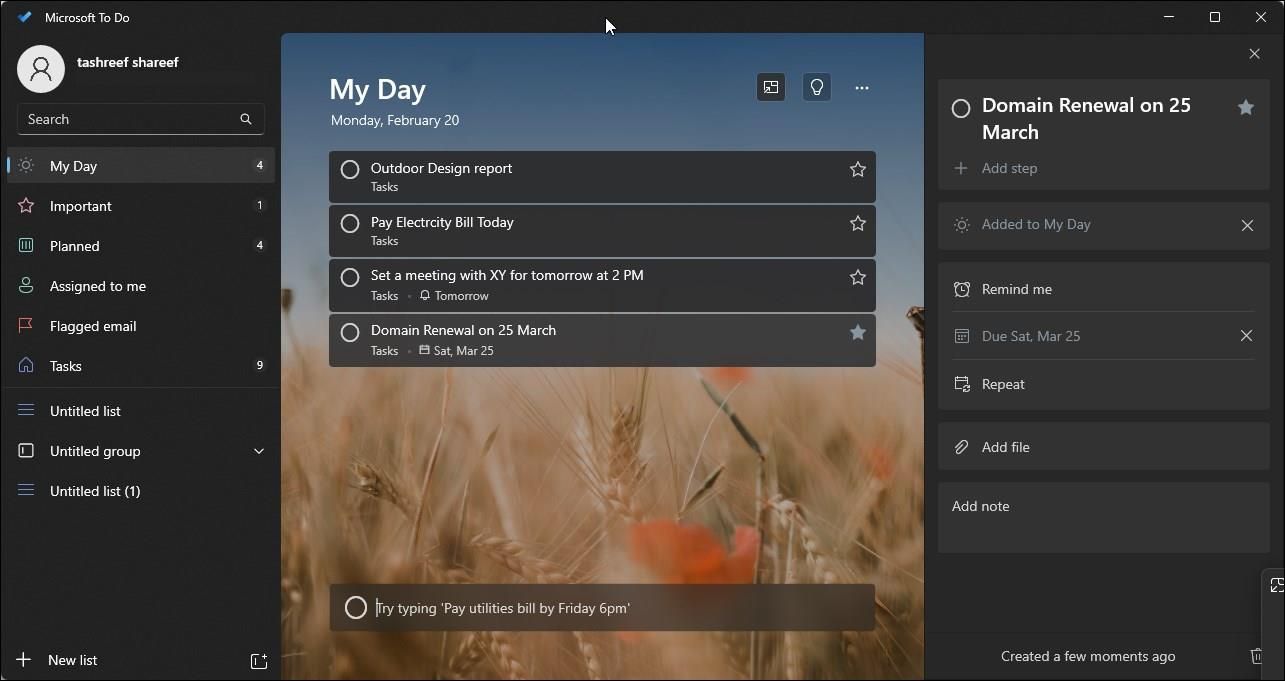
Microsoft To Do is a popular choice for Windows users, partly because it's developed by Microsoft and integrates well with other Microsoft tools like Outlook. It allows you to create and manage your to-do lists, set reminders, and even break down larger tasks into smaller steps.
- Pros: Integrates with Outlook, easy to use, allows task breakdown.
- Cons: Limited advanced features compared to some competitors.
2. Trello
Trello uses a Kanban board approach, which can be more visual and appealing for some users. It's highly customizable with boards, lists, and cards, making it suitable for a wide range of projects.
- Pros: Highly customizable, visual interface, good for project management.
- Cons: Can be overwhelming for simple to-do lists, not specifically designed for checklist management.
3. Any.do
Any.do offers a clean interface and robust features, including calendar integration, task sharing, and collaboration tools. It's a versatile app that can handle both simple to-do lists and complex projects.
- Pros: Clean interface, robust features, good for collaboration.
- Cons: Some features require a premium subscription.
4. TickTick
TickTick is another versatile app that offers a simple and intuitive interface. It supports checklist creation, task prioritization, and even includes a built-in Pomodoro timer for productivity.
- Pros: Simple interface, versatile features, Pomodoro timer.
- Cons: Limited integration with other apps.
Comparison of Free Checklist Apps
| App | Ease of Use | Customization | Syncing | Collaboration |
|---|---|---|---|---|
| Microsoft To Do | High | Medium | High | Medium |
| Trello | Medium | High | High | High |
| Any.do | High | High | High | High |
| TickTick | High | Medium | High | Medium |
Practical Insights and Tradeoffs
When choosing a free checklist app for Windows, consider your specific needs:
- For Simple Tasks: Microsoft To Do or TickTick might be more than sufficient.
- For Project Management: Trello's visual boards or Any.do's collaboration features might be more suitable.
Each app has its unique strengths, and there's no one-size-fits-all solution. It's essential to try out a few options to see which one aligns best with your workflow and preferences.
Real-World Example: Using a Checklist App for Project Management
Let's say you're managing a small project with a team. You've chosen Trello for its visual interface and collaboration features. You create boards for different project phases, lists for tasks within those phases, and cards for individual tasks. Team members can comment on cards, attach files, and move cards across lists as they progress. This visual approach helps keep everyone on the same page and makes task management more engaging.
FAQs
Q: Are these checklist apps truly free?
Yes, all the mentioned apps offer free versions with substantial features. However, some may have limitations or offer premium subscriptions for additional features.
Q: Can I use these apps for team projects?
Absolutely. Most of these apps, especially Trello and Any.do, offer robust collaboration features suitable for team projects.
Q: Do I need to be tech-savvy to use these apps?
No, all the mentioned apps are designed with user-friendliness in mind and are accessible to users with varying levels of tech expertise.
Q: Can I sync these apps across different devices?
Yes, all the mentioned apps offer syncing capabilities across Windows, iOS, and Android devices.
Conclusion
Finding the right free checklist app for Windows involves considering your specific needs, such as ease of use, customization options, and collaboration features. By understanding what each app offers and evaluating their tradeoffs, you can select an app that not only meets your requirements but also enhances your productivity. Whether you're managing simple to-do lists or complex projects, there's a free checklist app out there for you.
Related: Best Free Apps for Productivity
Related: A Practical Guide to Finding the Best Free Checklist App
