

You've probably experienced it - your phone suddenly vibrates in your pocket or purse, and you're left wondering why. Random phone vibrations can be annoying, distracting, and even worrisome. Is it a sign of a more serious issue or just a minor glitch?
Understanding Random Phone Vibrations
Random phone vibrations can occur on any smartphone, regardless of the operating system or model. They can be caused by various factors, including notification issues, app problems, or hardware malfunctions. To troubleshoot the issue, it's essential to understand the possible causes.
Possible Causes of Random Phone Vibrations
Notification issues: Unread notifications, especially from social media or messaging apps, can cause your phone to vibrate randomly.
App problems: Faulty or misconfigured apps can lead to random vibrations.
Hardware malfunctions: Issues with the phone's vibration motor or other hardware components can cause random vibrations.
System glitches: Software bugs or glitches can also lead to random phone vibrations.
Troubleshooting Random Phone Vibrations
To resolve the issue, follow these practical steps:
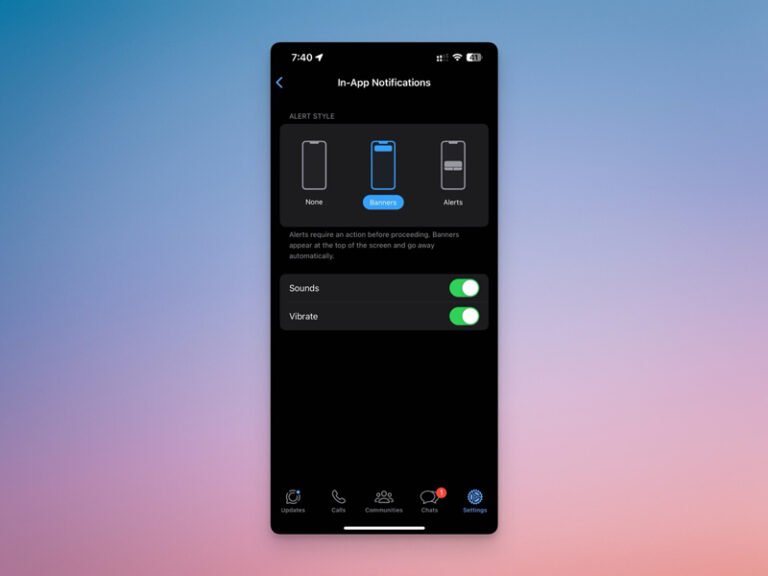
Check Notification Settings
- Go to your phone's settings app.
- Scroll down to "Notifications" or "Sound and vibration."
- Check if there are any unread notifications or notifications that may be causing the vibrations.
- Adjust the notification settings to prevent unwanted vibrations.
Identify Problematic Apps
- Go to your phone's settings app.
- Scroll down to "Apps" or "Application manager."
- Look for apps that may be causing the vibrations.
- Try uninstalling or updating the app to resolve the issue.
Inspect Your Phone's Vibration Settings
- Go to your phone's settings app.
- Scroll down to "Sound and vibration" or "Vibration."
- Check if the vibration settings are set to a high sensitivity level.
- Adjust the vibration settings to a lower level or turn off vibration for specific features.
Restart Your Phone
Sometimes, a simple reboot can resolve the issue. Restart your phone to:
- Close any running apps that may be causing the vibrations.
- Clear out temporary system glitches.
Advanced Troubleshooting Steps
If the issue persists, try these advanced troubleshooting steps:
Boot Your Phone in Safe Mode
Booting your phone in safe mode can help you identify if a third-party app is causing the issue.
Android: Press and hold the power button until your phone restarts. Release the power button and immediately hold down the volume down button. Keep holding the volume down button until your phone boots into safe mode.
iOS: Press and hold the sleep/wake button until the "Slide to Power Off" slider appears. Slide the slider to the right to turn off your phone. Press and hold the sleep/wake button again until the Apple logo appears.
Perform a Factory Reset
If all else fails, you may need to perform a factory reset to restore your phone to its default settings.
Android: Go to your phone's settings app > Backup & reset > Factory data reset.
iOS: Go to your phone's settings app > General > Reset > Erase All Content and Settings.
Comparison of Common Phone Vibration Issues
| Issue | Possible Causes | Solutions |
|---|---|---|
| Random vibrations | Notification issues, app problems, hardware malfunctions, system glitches | Check notification settings, identify problematic apps, inspect vibration settings, restart phone |
| No vibrations | Vibration motor issues, software glitches | Check vibration settings, restart phone, perform factory reset |
| Weak vibrations | Vibration motor issues, software glitches | Check vibration settings, restart phone, perform factory reset |
FAQs
Q: Why is my phone vibrating randomly when I'm not getting any notifications?
There could be several reasons, including app problems, hardware malfunctions, or system glitches. Try troubleshooting steps like checking notification settings, identifying problematic apps, and inspecting vibration settings.
Q: How do I stop my phone from vibrating randomly?
Try troubleshooting steps like checking notification settings, identifying problematic apps, inspecting vibration settings, and restarting your phone. If the issue persists, consider performing a factory reset.
Q: Can a virus cause my phone to vibrate randomly?
While it's unlikely, a virus or malware can cause random phone vibrations. Make sure to install antivirus software and keep your phone's operating system and apps up to date.
Q: Will a factory reset fix my phone's random vibrations?
A factory reset can fix software-related issues, including random phone vibrations. However, it will erase all data on your phone, so make sure to back up your data before performing a reset.
Final Tips and Best Practices
To minimize the occurrence of random phone vibrations:
Regularly update your phone's operating system and apps.
Install antivirus software to protect against malware.
Use a screen protector and phone case to prevent physical damage.
Avoid overloading your phone with too many apps or files.
By following these practical steps and tips, you can troubleshoot and fix random phone vibrations, ensuring a smoother user experience.
Related: What to Know About Cleaning Storage Without Deleting Apps
Related: How to Fix Internet Disconnections Without the Frustration
Related: 5 Useful Things to Know About Speeding Up Your Internet
